
Portable power · Laptops
Can a power bank fast-charge a MacBook Pro? The 96W and 140W rules
A big number on a power bank box feels like a promise. Plug it into a MacBook Pro, though, and the laptop decides how fast it charges, not the bank. Apple publishes the exact wattage each model wants. Here's how to match a power bank to it, and the one battery a carry-on bank can't fully refill.
By Adam Anderson, Editor and CEO, Gearsentials
This article contains paid Amazon links. Gearsentials may earn a commission from qualifying purchases. Affiliate standards.
Power banks in this guide
Paid links. Gearsentials may earn a commission from purchases.
What Apple actually asks for
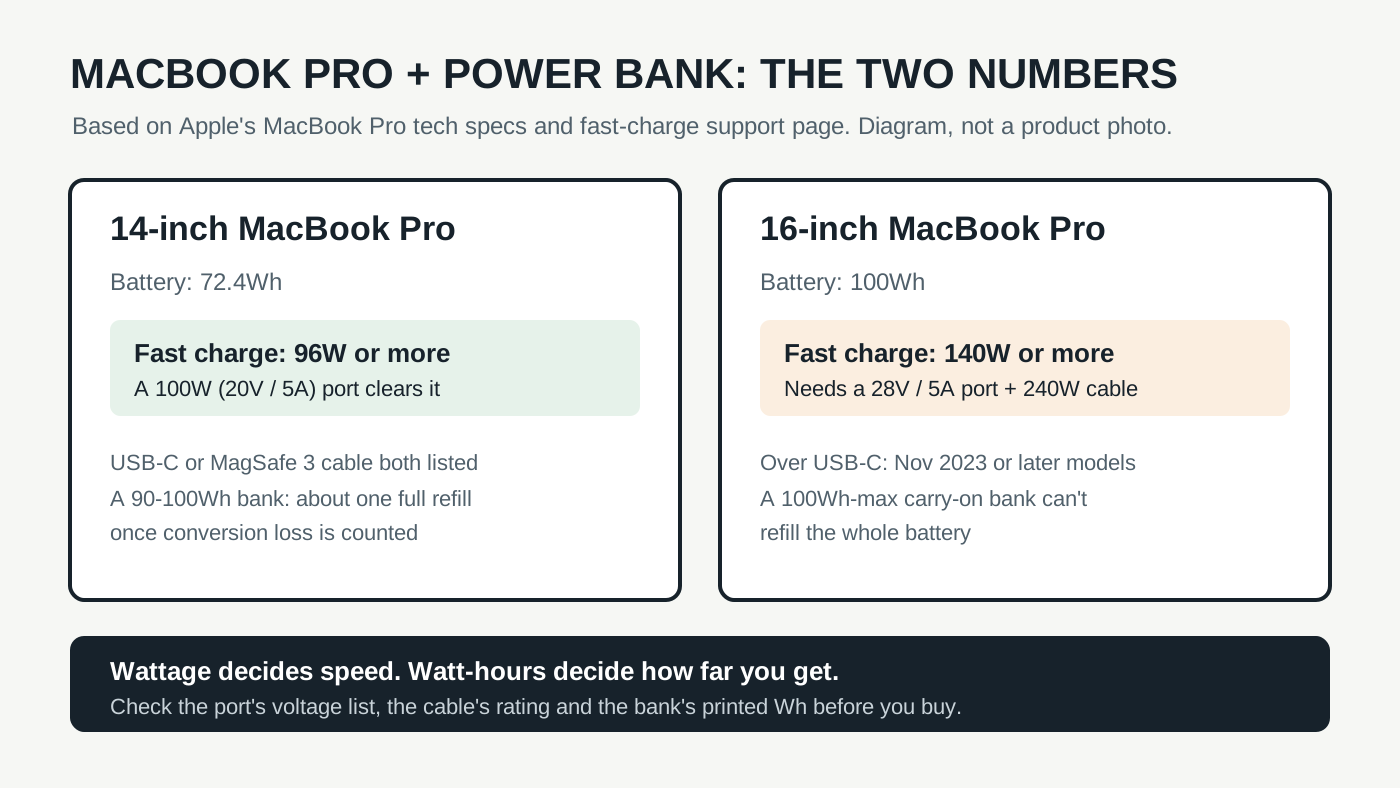
Apple's MacBook Pro tech specs say every current model charges from "a USB-C power adapter or other USB PD power source." A power bank that speaks USB Power Delivery counts. The same page lists two numbers per model: the minimum wattage Apple recommends, and the wattage that unlocks fast charging.
| Model | Battery | Recommended minimum | Fast charge |
|---|---|---|---|
| 14-inch, M6 | 72.4Wh | 60W | 96W or higher |
| 14-inch, M5 Pro or M5 Max | 72.4Wh | 70W | 96W or higher |
| 16-inch, M5 Pro | 100Wh | 94W | 140W or higher |
| 16-inch, M5 Max | 100Wh | 70W | 140W or higher |
Fast charging, per Apple's support page, means up to 50 percent in around 30 minutes. Below that line the laptop still charges. It just takes longer, and under a heavy workload a weak source may only slow the drain.
So the real question isn't "is this bank powerful?" It's "does one USB-C port reach 96W or 140W, and is the cable rated for it?" Total output doesn't help. A 300W bank spreads that across several ports.
The 14-inch is the easy one
The 14-inch needs 96W for fast charging. Many laptop power banks top out at 100W per port, which is 20 volts at 5 amps, and that clears Apple's bar. Apple lists both the USB-C to MagSafe 3 cable and a USB-C charge cable as fast-charge options for this size.
Anker's A1695 spec sheet shows exactly that: 20V at 5A, 100W max from its USB-C ports and built-in cables, a 90Wh battery and 595g. Its 165W total lets a phone charge alongside the laptop. Paying extra for a 140W port buys a 14-inch owner nothing on Apple's numbers.
For a 14-inch MacBook Pro
Paid links. Gearsentials may earn a commission from purchases.
Anker A1695, 25,000mAh / 90Wh, 100W per USB-C port, built-in USB-C cables. ASIN B0DCBB2YTR.
The 16-inch needs 140W, and most banks stop at 100W
Here's where the box number starts to matter. A 100W port sits above the 16-inch's recommended minimum on the M5 Max and just above it on the M5 Pro, so it charges. It doesn't fast-charge. For that, Apple wants 140W or higher.
140W over USB-C isn't just a bigger 100W. It uses USB Power Delivery's Extended Power Range at 28 volts and 5 amps. Notebookcheck's report on the first 140W MacBook Pro explains that Apple's 140W adapter was one of the first chargers built on that standard. On a spec sheet, look for 28V⎓5A in the USB-C output list. If the list ends at 20V⎓5A, the port tops out at 100W, whatever the total says.
Both Anker Prime banks list it. The Prime 20K (A110B) and the Prime 26K (A110A) each show 28V⎓5A, 140W max, on USB-C. Anker says the A110B needs a 5A cable to get there. Expert Reviews found the A110A could run both USB-C ports at 140W plus the USB-A port at 20W at the same time.
| Power bank | Printed energy | Best single USB-C port | Weight |
|---|---|---|---|
| Anker Laptop Power Bank 25K (A1695) | 90Wh | 100W (20V / 5A) | 595g |
| Anker Prime 20K (A110B) | 72.36Wh | 140W (28V / 5A) | 510g |
| Anker Prime 26K (A110A) | 99.75Wh | 140W (28V / 5A) | 600g |
140W options for a 16-inch MacBook Pro
Paid links. Gearsentials may earn a commission from purchases.
Both list 28V⎓5A (140W) USB-C output. A110A: 26,250mAh / 99.75Wh, ASIN B0F66LNB8D. A110B: 20,100mAh / 72.36Wh, ASIN B0F66NH2ZX.
The cable and the model year can still stop you
A 140W port doesn't help if the cable can't carry 5 amps. Apple pairs 16-inch USB-C fast charging with its 240W USB-C Charge Cable, and Anker says the A110B needs a 5A cable to reach 140W. Look for 5A or 240W on the cable before you blame the bank.
Then check the model year. Apple's fast-charge page lists 16-inch fast charging over a USB-C cable only for the MacBook Pro (16-inch, Nov 2023) or later. On the 2021 and early 2023 16-inch models, Apple documents fast charging only through the USB-C to MagSafe 3 cable on its 140W adapter. It doesn't say anything about a power bank on that cable, so plan on normal speed from a bank with those older models.
Not sure which you have? Apple menu > About This Mac shows the model name and year.
How far a full bank actually gets you
Speed is half of it. Capacity is the part buyers get wrong. US carry-on rules generally cap a spare battery at 100Wh, and the 16-inch MacBook Pro's own battery is 100Wh. Even a bank right at the limit can't refill it, because energy is lost turning the bank's cell voltage into USB-C power. Anker's own A110A FAQ calls a 30 to 45 percent loss normal and says the 26,250mAh bank delivers about 15,200mAh.
Independent numbers line up. Macworld tested a different 99.54Wh bank, the EcoFlow RAPID Pro 27K. It got a 14-inch MacBook Pro to about 117 percent in total, a bit more than one full charge, and Macworld estimated 70 to 75 percent of a 16-inch battery.
That makes the tradeoff on the Anker Primes simple. The 26K packs 99.75Wh, the most you can carry on, for 600g. The 20K saves 90g but holds 72.36Wh, so it gives a 16-inch noticeably less than the 26K. Fast charging empties either bank sooner too. Pull 140W for 30 minutes and you've spent a big chunk of what's inside.
Flying with one? Our laptop power banks under 100Wh guide covers the airline rules, seat-outlet bans and overhead-bin limits.
The final decision
Match the bank to the laptop, not to the biggest number on the box. For a 14-inch MacBook Pro, the Anker Laptop Power Bank 25K (A1695) is the sensible pick: its 100W ports already hit Apple's 96W fast-charge line, 90Wh is about one full refill, and the built-in cables mean there's nothing to forget.
A 16-inch from November 2023 or later needs a 28V port and a 240W cable to fast-charge. The Anker Prime 26K (A110A) is the stronger match there, because it carries the most energy a carry-on allows. The Prime 20K (A110B) makes sense when 90g matters more than reach, or when you mostly top up between meetings.
Skip the 140W banks if you have a 14-inch, or an older 16-inch you only charge over USB-C. Neither gets faster charging out of the extra watts. And if you're hoping for a full refill of a 16-inch on a plane, no bank you can carry on will do it.
Match the bank to your MacBook Pro
Paid links. Gearsentials may earn a commission from purchases.
14-inch: Anker 25K (100W, 90Wh). 16-inch Nov 2023 or later: Prime 26K for the most energy, Prime 20K for less weight. Bring a 5A / 240W cable for the Primes.
Sources
- Apple: MacBook Pro tech specs
- Apple: Fast charge your MacBook Air or MacBook Pro
- Apple: Charge the MacBook Pro battery
- Notebookcheck: 16-inch MacBook Pro and USB-C Extended Power Range
- Anker: Power Bank 25K 165W (A1695) specifications
- Anker: Prime Power Bank 20K 220W (A110B)
- Anker: Prime Power Bank 26K 300W (A110A)
- Expert Reviews: Anker Prime A110A review
- Macworld: EcoFlow RAPID Pro 27K review