
Smart home · Robot vacuums
Roborock Saros 20 setup: where the dock goes, the first map and the settings to change
The box is open, the dock is heavy, and the obvious spot is the corner behind the couch. That spot decides whether this robot finds home every night or calls you for help. Here's the setup in the order that avoids redoing it, plus the settings that stay off until you switch them on.
By Adam Anderson, Editor and CEO, Gearsentials
This article contains paid Amazon links. Gearsentials may earn a commission from qualifying purchases. Affiliate standards.
The robot in this guide
Paid links. Gearsentials may earn a commission from purchases.
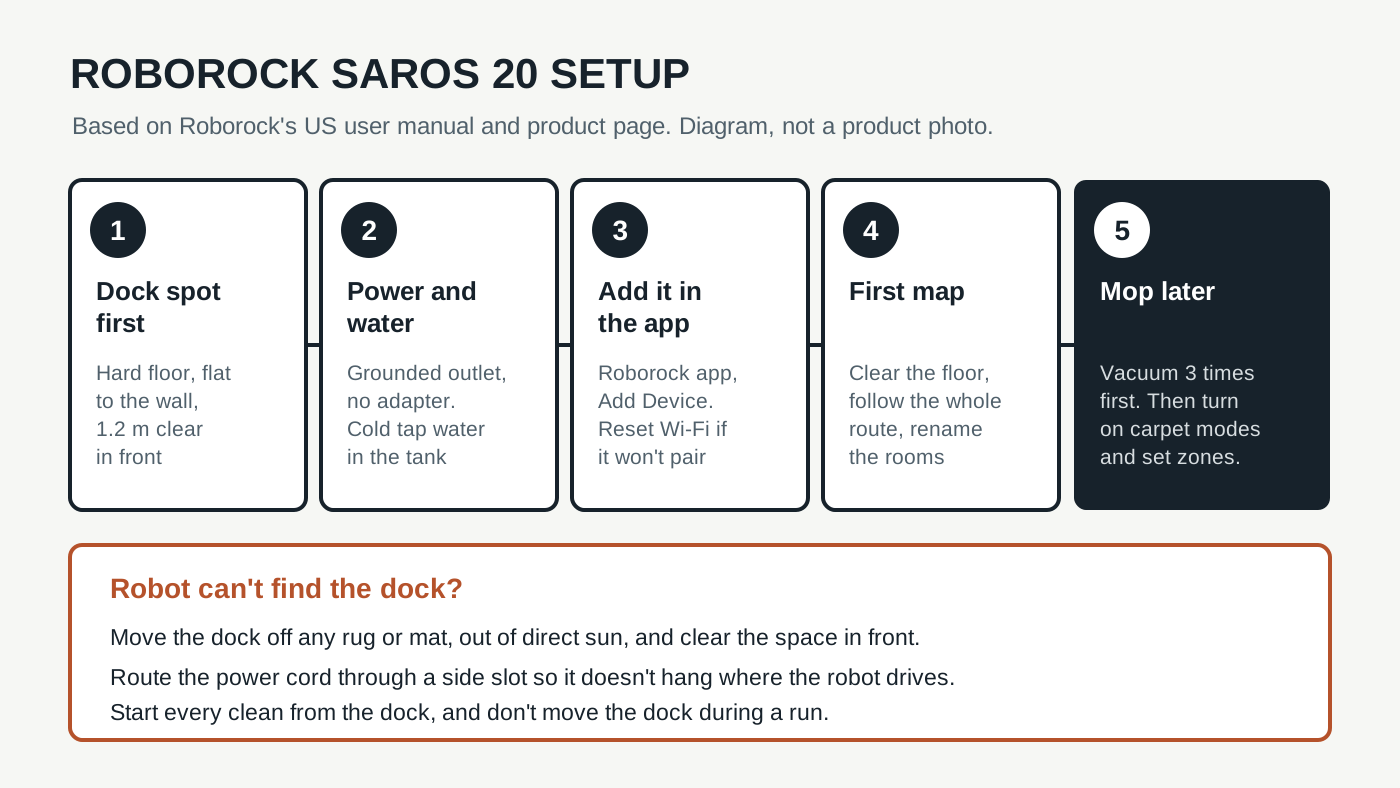
Step 1: Pick the dock spot before you plug anything in
Roborock's US user manual is specific here. The dock goes on a hard, flat floor like wood, tile or concrete, pushed flat against a wall. It also needs open space around it:
| Space | Roborock's number |
|---|---|
| In front of the dock | At least 1.2 m (3.94 ft) |
| Height above the floor | At least 0.75 m (2.47 ft) |
| Width | At least 0.4 m (1.32 ft) |
| Dock size (Roborock spec) | 15.00 × 18.70 × 19.21 in |
The dock size comes from Roborock's Saros 20 page. Get the tape measure out before you choose. That 1.2 m in front is the robot's runway, so a dock tucked into a tight hallway nook or behind a door that swings shut is asking for trouble.
Three placement mistakes show up in the manual's fine print. A dock on a rug or mat can tilt, and Roborock says that causes docking problems. Direct sunlight, or anything that covers the dock's location beacon, can stop the robot from finding its way back. And a power cord that hangs straight down to the floor can get caught by the robot and pull the dock loose. Route the cord out through the left or right slot on the back.
One more check: Wi-Fi. Roborock asks for good coverage at the dock spot. The robot sits there most of the day, so a dead zone means schedules and maps that don't sync.
Step 2: Power and water
Plug the dock straight into a grounded 120-volt outlet. The manual says not to use an adapter, and the dock's rated input is 12 amps while it heats mop-wash water. That's a big appliance load, so a wall outlet beats a thin extension cord.
Fill the clean water tank with cold tap water. Roborock says cold only, to stop the tank from deforming. The dock heats the water itself when it washes the mops. If you use floor cleaner, it goes in the separate cleaning solution cartridge, never the clean tank, and Roborock says to use only its own solution and no disinfectant. Don't use cleaner every day? You can turn off Smart Cleaning Solution Filling in the app.
Step 3: Connect the app
Hold the power button to turn the robot on, set it in front of the dock and let it charge. Then install the Roborock app and tap Add Device. If the robot won't pair, the manual's fix is a Wi-Fi reset: hold the two robot buttons together until it says "Resetting WiFi," wait for the slow blue flash, and add it again as a new device.
TechRadar's reviewer found the Wi-Fi setup painless and the first mapping run quick. Their map was decently accurate, though it labeled a living room as a sunroom. Rename rooms right away. Every schedule and no-go zone you set later hangs off those room names.
Step 4: The first map, and a delay before mopping
Clear the floor first. The manual asks you to pick up cords, loose items and anything fragile, including the dock's own cord. Then press clean and follow the robot through its whole first route. Roborock says to watch for problem spots on that first run, and that it can clean on its own after that.
Hold off on mopping. Roborock says to vacuum the floors at least three times before the first mop cycle, so the pads don't pick up a build-up of dirt. It's an easy step to skip, and the one that makes a brand-new mop look bad.
Live in a loft or have an open landing? Roborock wants a physical barrier anywhere the robot could fall, even with its cliff sensors. The manual also says not to leave shoes or mats near stairs, because they can confuse those sensors.
Roborock Saros 20
Paid links. Gearsentials may earn a commission from purchases.
Standard Saros 20 with the tank dock described in Roborock's US manual, ASIN B0G64MM1HM. Not the Saros 20 Sonic.
Rugs, carpet and thresholds: the settings you switch on
A lot of the Saros 20's headline tricks are off until you turn them on. Roborock's product page marks the deep cleaning mode for carpets up to 1.18 inches, the cleaning behind marked curtains and the stain-type detection as features you have to enable in the app. Curtains also have to be marked on the map by hand.
For rugs that should never get wet, there are two tools. The manual says the robot detaches its mop pads to clean carpet first, and you can also mark a carpet as a no-go zone. Vacuum Wars lists no-mop zones and no-go zones among the app's controls. Use a no-mop zone for a rug you still want vacuumed, and a no-go zone for tassels, bath mats and anything that bunches up.
Be careful with very thick rugs. The product page says the chassis can lift for carpet up to 1.18 inches deep, but the manual's safety list still says not to use it on high-pile carpets and that dark carpet can reduce how well it works. Treat a shag rug as a test, not a promise.
Thresholds work the same way. Roborock's 3.46-inch figure is for a two-step threshold, which Vacuum Wars lists as up to 1.77 inches for the first step and 1.69 inches for the second. In its single-barrier test, the robot crossed 2.24 inches after some repositioning. TechRadar saw it hesitate at first, then learn to back up, lift its front and cross. So don't judge a tall doorway on day one. Give it a few runs.
Do Not Disturb and schedules
The default Do Not Disturb window runs from 10 p.m. to 8 a.m. That matters more than it sounds. The manual says the robot won't auto-empty if it returns to the dock during Do Not Disturb, and DND blocks the top-up charge it uses to resume a half-finished job. If you schedule a late clean, either move the window or let it run earlier.
Scheduled cleans also need at least 15% battery. Start each run from the dock and don't move the dock mid-clean, or the robot may not find its way back. If you carry the robot somewhere for a spot clean, the manual says it may rebuild its map and need to be set back on the dock by hand.
What the dock won't do for you
The dock empties the bin, washes the mops in hot water, dries them and refills the robot. TechRadar said the only chores in about a month were filling the clean tank and emptying the dirty one. Its spec list puts those at 4 liters clean and 3.5 liters dirty.
The rest is still on you. Roborock's maintenance schedule:
| Part | Clean | Replace |
|---|---|---|
| Main brushes | Clean every 2 weeks | Replace every 6–12 months |
| Washable filter | Clean every 2 weeks, dry 24 hours | Replace every 6–12 months |
| Side brush | Clean monthly | Replace every 3–6 months |
| Mop cloths | Clean as needed | Replace every 1–3 months |
| Sensors, wheels, contacts | Wipe dry as needed | — |
Pet homes should also know the robot's own dustbin is small. Vacuum Wars measured 260 mL against a 377 mL average and warned it can fill before the robot heads back to empty. More frequent, shorter runs help.
Can you plumb it in?
Not with a setting. Roborock's launch announcement mentions optional refill and drainage integration, and Roborock publishes a separate manual for a refill-and-drainage version. That version connects to a water line and a drain, needs water pressure in a set range and has its own install steps. This guide follows the standard tank dock in the US manual. If carrying water tanks is the deal-breaker, check which dock you're buying before you order.
The final decision
The Saros 20 is easy to set up badly and just as easy to set up well. The difference is mostly the dock spot: hard floor, flat to the wall, about 4 feet of runway, no sun on the front and the cord tucked into its side slot. Get that right, vacuum three times before you mop, and turn on the carpet and curtain features yourself.
It's a good fit if your home has tall doorway transitions, thick rugs or low furniture, and you're fine filling and emptying two tanks every so often. The extra settings reward people who'll spend 20 minutes in the app after the first map.
Skip it if there's no hard-floor spot with that much open space near an outlet, or if you want a robot you never have to think about. It still needs brush checks, filter drying and a clear floor. And if water tanks are the problem, look for the plumbed version rather than hoping the standard dock will change.
If you've got the space for the dock
Paid links. Gearsentials may earn a commission from purchases.
Best for homes with tall thresholds, thick rugs and low furniture. Measure the dock spot first: hard floor, about 4 ft clear in front.
Still choosing a robot? Our Roborock Saros 20 vs Dreame X60 Max Ultra Complete comparison covers independent tests on pet hair, obstacles, mopping and thresholds.