
Smart home · Video doorbells
Ring battery doorbell on your old doorbell wires: will the chime still ring?
You bought a battery doorbell so you wouldn't have to deal with wiring. Then you took the old button off and found two wires sticking out of the wall. They can still be useful, as long as you check two things first.
By Adam Anderson, Editor and CEO, Gearsentials
This article contains paid Amazon links. Gearsentials may earn a commission from qualifying purchases. Affiliate standards.
The doorbells in this guide
Paid links. Gearsentials may earn a commission from purchases.
Why wire a battery doorbell at all?
Two reasons, and they're separate. The first is the chime. Without wires, pressing a Ring battery doorbell sends an alert to your phone, and that's it. If you want the old ding-dong in the hallway, the doorbell has to be wired to it. The second is charging. Ring says connecting a battery doorbell to existing wiring, a transformer or its Plug-In Adapter gives the battery a trickle charge.
All three current models can do both. Ring's product pages for the Battery Doorbell 2K and Battery Doorbell 2K Plus list "Works with in-home chime" when the doorbell is hardwired to your existing system, and Ring's hardwiring guidelines cover the 4K Pro the same way. A quick naming note: these are the models Ring used to sell as Battery Doorbell, Battery Doorbell Plus and Battery Doorbell Pro (2nd Gen). Ring's own FAQ says only the name changed.
Here's the odd part. Some of Ring's plug-in models are worse at this. The same guidelines say the Wired Doorbell 2K Plus and the Wired Doorbell 4K Pro (unless it runs on PoE) can't ring an existing chime at all. So if keeping the old chime matters, the battery models are the easier fit.
First, check the transformer
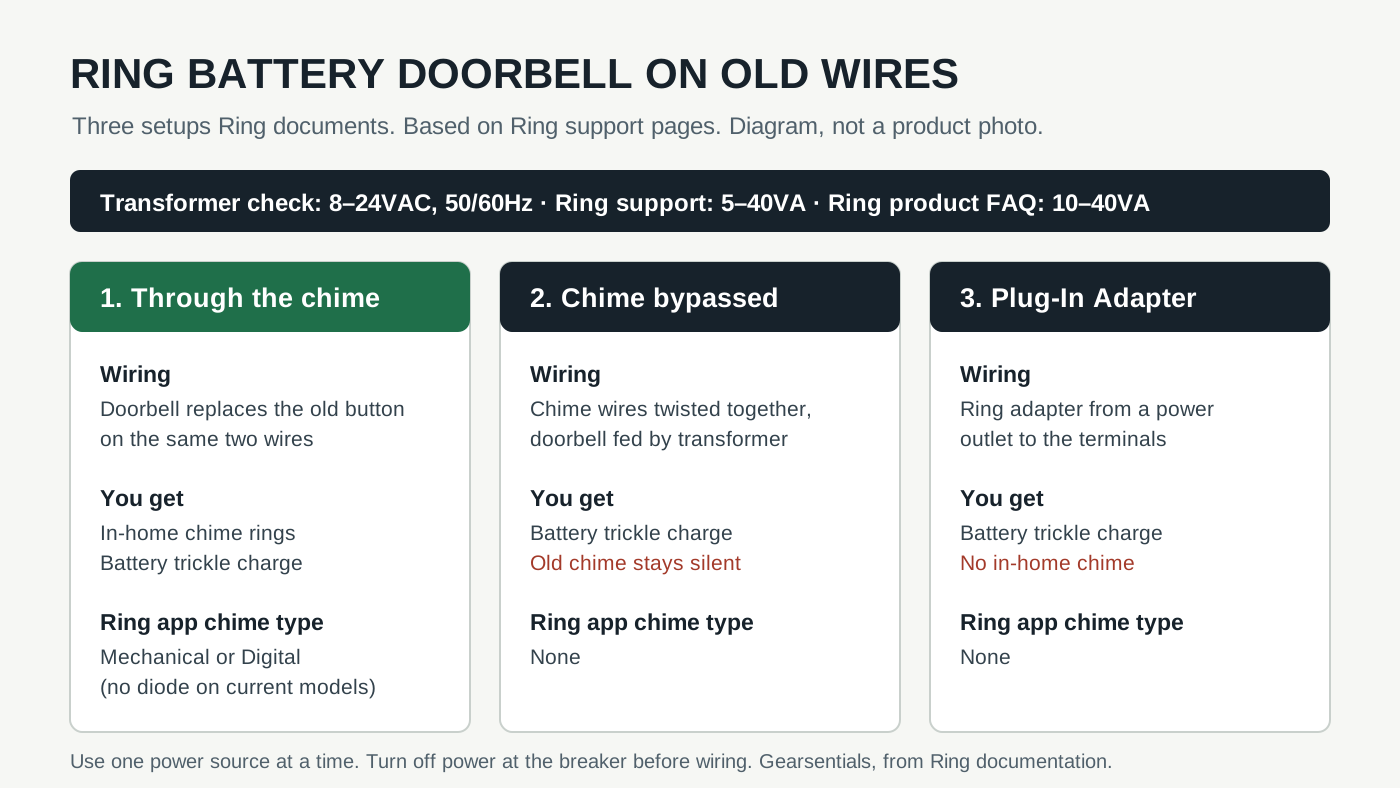
Those two wires carry low-voltage power from a doorbell transformer somewhere else in the house. Its label should list its voltage (VAC) and power (VA). Ring's guidelines give one range for every battery doorbell: 8 to 24VAC, 50/60Hz, 5VA to 40VA.
One small catch. The FAQ on Ring's current product pages lists 8–24VAC with 10–40VA for trickle charging, which is a higher floor than the support page. If your transformer is rated between 5 and 10VA, you're in the gap between Ring's two documents. Treat 10VA as the safer floor, since that's where both of Ring's documents agree.
Above 24VAC or 40VA is the hard no. Ring says incompatible power can damage the doorbell and cause electric shock. And whatever the numbers say, turn the power off at the breaker first. Ring also notes that some places require an electrician or a permit for this work.
The three ways to wire it
Ring's hardwiring article lays out three setups, and the right one depends on whether you want the chime.
- Through the in-home chime.The doorbell takes the old button's place on the same two wires. You hear the chime, and the battery gets its trickle charge. For the current battery models, Ring's table says no diode is needed for a digital chime. Its table lists a diode only for the first Video Doorbell and the Video Doorbell 2.
- Straight to the transformer, chime bypassed. You take the two wires off the chime's terminals and twist them together. The doorbell still gets power, but the old chime goes quiet for good. Ring says the current battery models don't need a resistor or Pro Power Kit for this.
- Ring Plug-In Adapter.A cable that runs from a power outlet to the doorbell's terminals, which helps when there are no doorbell wires. There's no chime in this setup.
Two practical details. The doorbell connects to the wires with two screw terminals on the back. If the wires are too short, Ring says to use the included wire extenders and wire nuts. And use only one power source at a time. Ring's install guide names solar, the Plug-In Adapter and doorbell wiring as the options, and says to pick one.
All three can use existing doorbell wires
Paid links. Gearsentials may earn a commission from purchases.
Mechanical or digital chime: the setting that matters
Wiring is half the job. The Ring app has to know what kind of chime is on the other end. Ring's steps call this the setting that prevents device damage, so don't skip it.
You can tell the two types apart by ear. Ring's chime guide describes a mechanical chime as a bell and hammer making a classic ding-dong. A digital chime plays recorded tones through a speaker and often lets you pick a tune. In the app, go to the doorbell's Device Settings, then In-home Chime Settings. Battery doorbells get an Automatic Chime Detection option that rings the chime and asks you how it sounded. If that doesn't land, Advanced Settings lets you pick Mechanical, Digital Type 1, Digital Type 2 or None by hand.
Choose None if you bypassed the chime, wired straight to the transformer or used the Plug-In Adapter. If the chime buzzes, stays silent or plays half a tone, Ring's first fix is to check that setting and that "Ring my In-home Chime" is on. Its wiring check is simple: take the doorbell off the wall and briefly touch the two doorbell wires together. If they're wired to the chime correctly, the chime rings. Ring says not to do that test on a bypassed chime or a direct transformer setup.
What trickle charging won't do
"Hardwired" makes it sound like you'll never charge the battery again. Ring doesn't say that. It calls the wired power a trickle charge, and the battery is still the doorbell's power source. Ring doesn't promise the wires will keep it full, so plan for an occasional recharge anyway.
That makes the battery design matter more than the spec sheet suggests. Ring's charging guide says the Battery Doorbell 2K has a built-in battery. To charge it, you pop the whole doorbell off its bracket and plug it in, and a full charge can take up to 10 hours. The 2K Plus and 4K Pro use a removable Quick Release Battery Pack instead. TechRadar's 2K Plus review liked that you can swap in a spare and keep the doorbell on the wall, and it lists the same 8–24VAC trickle option. Expert Reviews' review also points out that no chime comes in the box.
You can check how it's going in the app. Ring's charging guide shows the doorbell's Power Source and Battery Level under Device Health. That's where you'll see whether the wires are actually doing anything.
If there are no wires at all
Then the battery doorbell is doing exactly what it's for. You'll just need another way to hear it inside. Ring's chime guide points to a plug-in Ring Chime or Chime Pro, or an Alexa Echo speaker, for alerts without wiring. Tom's Guide's 4K Pro review used that kind of setup on a garage with no existing chime or wiring, paired with Ring's plug-in Chime Plus. Budget for one of those if you don't have an Echo where you'd want to hear the door.
Our Ring Battery Doorbell vs Plus vs Pro comparison covers the rest of the choice: video, motion detection, subscriptions and Wi-Fi.
The final decision
If your old wires connect to a working chime and a transformer in Ring's range, use them. You keep the chime everyone in the house already listens for, and you get a trickle charge for free. That works with any of the three. Wire it through the chime, set the chime type in the app, and run the test press before you put the faceplate on.
Which model to buy comes down to how you'll handle the recharges that wiring won't prevent. The 2K Plus is the safe pick for most wired doors, because the swappable battery means a recharge never takes the doorbell off the wall. The 4K Pro shares that battery design, so pay extra only for its camera and motion features. The base 2K makes sense when the trickle charge is keeping up and the occasional full-unit recharge doesn't bother you.
Skip the wiring if your transformer is above 24VAC or 40VA, or you can't find its rating. Run the doorbell on battery and add a plug-in chime. And if the door has no wires at all, the same plan works. That's what these doorbells were built for.
Pick by recharge plan
Paid links. Gearsentials may earn a commission from purchases.
Sources
- Ring: Hardwiring your battery-powered Ring doorbell
- Ring: Guidelines for hardwiring your Ring video doorbell
- Ring: Configuring and troubleshooting your in-home chime
- Ring: Installing battery-powered doorbells
- Ring: Charging your Ring doorbell
- Ring: Battery Doorbell 2K product page
- Ring: Battery Doorbell 2K Plus product page
- TechRadar: Ring Battery Doorbell Plus (2nd Gen) review
- Expert Reviews: Ring Battery Doorbell Plus (2nd Gen) review
- Tom's Guide: Ring Battery Doorbell Pro (Retinal 4K) review