
Headphones · iPhone compatibility
Sony WH-1000XM6 with an iPhone: what works, what you lose, and who should buy them
Sony's spec sheet is full of badges: LDAC, LE Audio, head tracking, Fast Pair. Plenty of them never switch on when the phone in your pocket is an iPhone. The noise cancelling still does. So the real question is how much of the box you're paying for and won't get to use.
By Adam Anderson, Editor and CEO, Gearsentials
This article contains paid Amazon links. Gearsentials may earn a commission from qualifying purchases. Affiliate standards.
The headphones in this guide
Paid links. Gearsentials may earn a commission from purchases.
Pairing with an iPhone
There's no pop-up card like you get with AirPods. You pair from the iPhone's Bluetooth menu, the old-fashioned way. Sony's iPhone pairing steps are short:
- Turn the headphones on. Out of the box they go straight into pairing mode.
- For a second device, hold the Bluetooth button for about five seconds until the light double-flashes and you hear "Pairing."
- On the iPhone, open Settings, then Bluetooth, and tap WH-1000XM6.
Then install Sony's Sound Connect app. It isn't optional if you want to change the EQ, the noise cancelling, or turn on the two-device connection covered below. The headphones remember up to eight devices, and the ninth one bumps the oldest.
What works the same on an iPhone
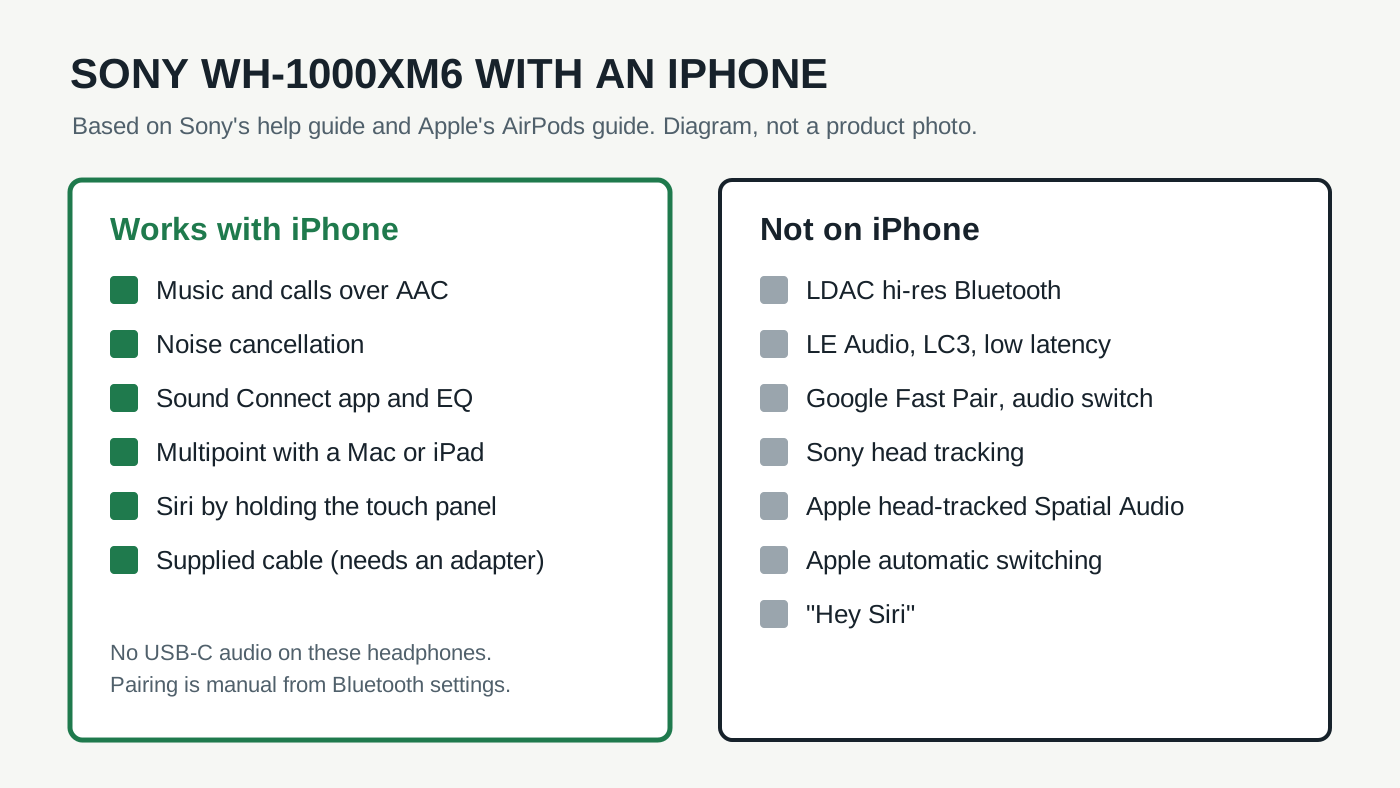
The big-ticket item makes the trip: noise cancelling doesn't care what phone you use. Neither does the fit, the folding design, or the touch controls for play, skip and volume.
Sound Connect runs on iOS, and nearly everything in Sony's app feature list comes along with it: the equalizer, ambient sound levels, Speak-to-Chat, wear detection and firmware updates. That last one matters. Unlike AirPods on Android, you won't need to borrow someone else's phone to keep the headphones current.
Siri works too, with one catch. Sony's Siri instructions say you hold a finger on the touch panel to start it. Saying "Hey Siri" won't wake it through the headphones, even with that setting on in the phone.
Sony WH-1000XM6
Paid links. Gearsentials may earn a commission from purchases.
Sony WH-1000XM6, black, ASIN B0F3PQHWTZ. Noise cancelling, the Sound Connect app and firmware updates all work from an iPhone.
The codec question: AAC, not LDAC
Sony's codec page lists SBC, AAC and LDAC for normal Bluetooth, plus LC3 for LE Audio. An iPhone uses AAC. Sony itself describes AAC as the codec used mainly by Apple products like the iPhone. LDAC, Sony's higher-bitrate option, stays switched off.
Expert Reviews says it plainly: LDAC is only for Android phone owners, so iPhone owners miss out on hi-res Bluetooth. The same review still called the headphones highly accomplished on AAC. That's the honest read. You lose a spec, not the reason most people buy these.
If hi-res is the point for you, Bluetooth is the wrong place to look on an iPhone with any headphones. Tom's Guide notes that no Bluetooth codec is lossless in the first place.
What you lose with an iPhone
Most of this list is Android-only by design. A few items are Apple features that only work with Apple's own headphones.
| Feature | Why it's missing |
|---|---|
| LDAC | iPhone streams AAC to these headphones |
| LE Audio, LC3 and Low latency mode | Sony's setup steps are for Android phones that support LE Audio |
| Google Fast Pair and audio switch | Google features for Android devices |
| Sony spatial sound head tracking | TechRadar found it needs Android's built-in head tracking |
| Apple head-tracked Spatial Audio | Apple lists AirPods models for it |
| Automatic switching across Apple devices | An AirPods feature tied to your Apple Account |
The LE Audio line is the one gamers should notice. Sony's LE Audio guide walks through it on Android only, and that's where the low latency mode lives. The audio switch feature is Google's, and it runs through Fast Pair.
Head tracking is the one that trips people up, because both companies use the phrase. TechRadar's review says Sony's head tracking rules out Apple devices. And Apple's own Spatial Audio guide names AirPods 3, 4 and 5, AirPods Pro and AirPods Max. You can still play Sony's 360 Reality Audio from a supported paid music app, but that's a different thing from Apple Music's head-tracked mode.
An iPhone and a Mac at the same time
Here's where it gets better than you'd expect. AirPods hop between your Apple devices on their own. Apple's switching guide ties that to AirPods signed in to your Apple Account. The Sony headphones can't do that trick. What they do have is multipoint: two live connections at once.
Sony's multipoint steps have you turn on "Connect to 2 devices simultaneously" in the app, then connect the second device. After that, the headphones play whichever device played last. Start a video on the Mac and the sound moves there. A call comes in on the iPhone and it rings in your ears.
What Hi-Fi said multipoint works very well in its testing, using that same laptop-plus-phone example. The limit is two. Connect a third device and the one that didn't play last gets dropped.
Wired listening on an iPhone
The XM6 come with a 3.5mm cable, and Sony's cable guide says noise cancelling still works over it when the headphones are on. They'll even play with the power off, minus the noise cancelling. That's handy on a plane's seat-back screen.
An iPhone has no headphone jack, though, so you'd need a USB-C or Lightning to 3.5mm adapter. And plugging the headphones' charging port into the phone won't carry sound. What Hi-Fi notes they still can't play audio over USB-C.
The final decision
Buy the Sony WH-1000XM6 for your iPhone if you want strong noise cancelling, a comfortable fold-up pair and a real equalizer, and you can live with AAC. You're giving up LDAC, LE Audio, Fast Pair and head tracking. The first three don't run on an iPhone with any headphones, so that part of the loss is mostly on paper. Multipoint with a Mac or iPad covers a lot of the hopping that AirPods do automatically.
Think twice if your whole day is spread across an iPhone, an iPad and a Mac and you want the sound to follow you without touching anything. Tom's Guide makes the same point about AirPods Max: they cost more, but they do more with iOS, iPadOS and macOS. Head-tracked Spatial Audio in Apple Music is another reason to stay with Apple's own headphones.
And if you'd switch to Android someday, the XM6 get better the day you do. Everything in the table above unlocks on the right phone.
If AAC and two-device multipoint are enough
Paid links. Gearsentials may earn a commission from purchases.
Best for iPhone owners who want Sony's noise cancelling and app controls and don't need Apple's automatic switching or head tracking.
Still choosing between flagship noise-cancelling headphones? Our Sony WH-1000XM6 vs Bose QuietComfort Ultra 2 comparison covers fit, USB-C audio, wired use and battery.
Sources
- Sony Help Guide: Pairing and connecting with an iPhone
- Sony Help Guide: Supported codecs
- Sony Help Guide: Pairing with an Android smartphone using LE Audio
- Sony Help Guide: Switching audio with audio switch
- Sony Help Guide: Multipoint connection
- Sony Help Guide: Using Siri
- Sony Help Guide: Using the supplied headphone cable
- Sony Help Guide: What you can do with the Sound Connect app
- Apple: Control Spatial Audio and head tracking on AirPods
- Apple: Switch AirPods between Apple devices
- Expert Reviews: Sony WH-1000XM6 review
- TechRadar: Sony WH-1000XM6 review
- What Hi-Fi?: Sony WH-1000XM6 review
- Tom's Guide: Sony WH-1000XM6 review