
Earbuds · Android compatibility
AirPods Pro 3 on Android: what works, what you lose, and who should still buy them
Maybe you like how AirPods Pro 3 fit. Maybe a friend swears by the noise cancellation. But your phone is a Pixel or a Galaxy. The good news is that they'll connect. The catch is that a lot of what makes them cost more lives inside Apple's own phones, tablets and laptops, and Android can't reach it.
By Adam Anderson, Editor and CEO, Gearsentials
This article contains paid Amazon links. Gearsentials may earn a commission from qualifying purchases. Affiliate standards.
The earbuds in this guide
Paid links. Gearsentials may earn a commission from purchases.
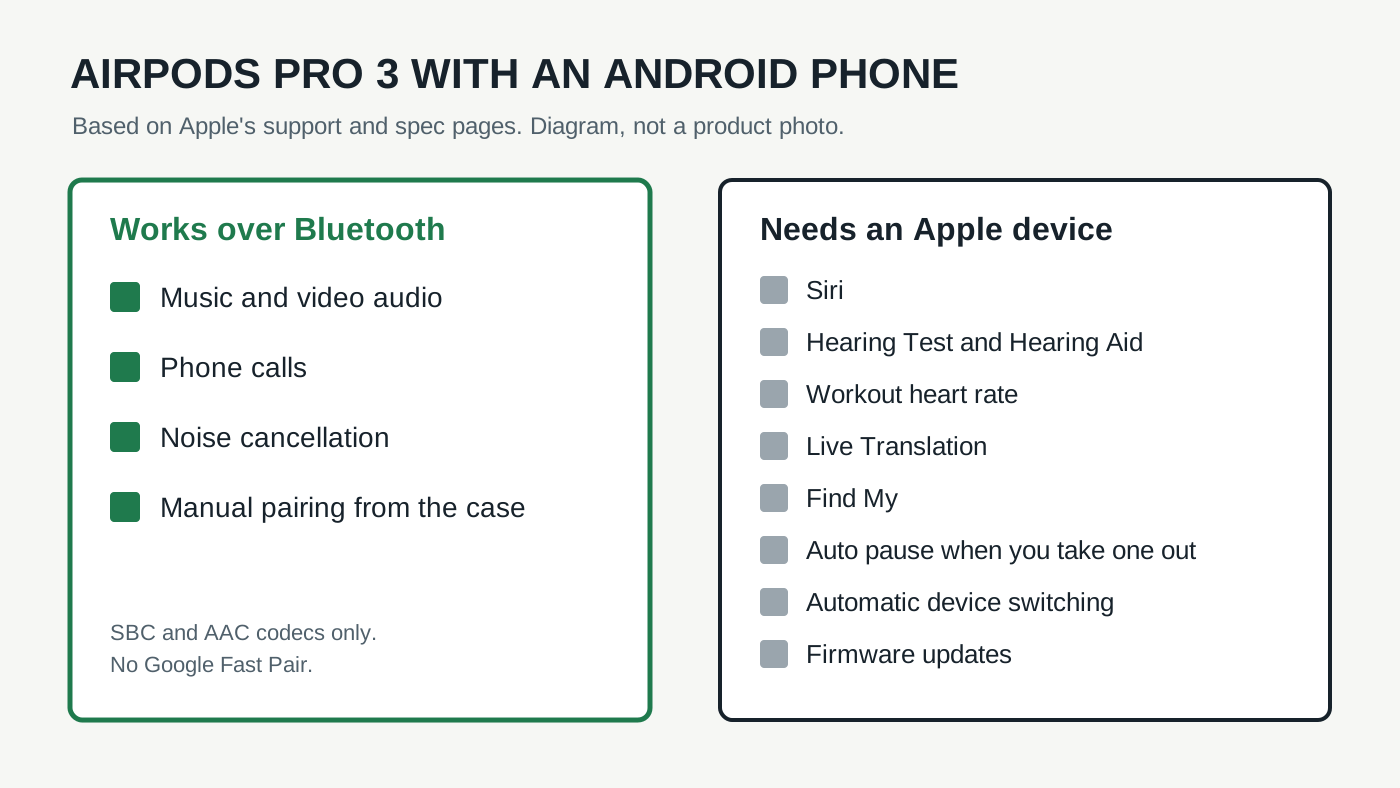
Pairing without an iPhone
On an iPhone, you open the case and a card pops up. On Android, there's no pop-up. Apple's guide for non-Apple devices gives the steps for AirPods Pro 3:
- Turn on Bluetooth on the phone. On many Android phones it's under Settings, then Connections.
- Open the case with both earbuds inside and hold it near the phone.
- Double-tap the front of the case until the status light flashes white.
- Pick the AirPods from the phone's Bluetooth list.
That double-tap is new with this generation. Older AirPods Pro had a button on the back of the case. Mashable's Android-using reviewer found the tap finicky and said it took several tries. AirPods also don't support Google's Fast Pair, so you do the pairing by hand each time you add a new Android device.
What still works
Apple puts it plainly: with a non-Apple device, AirPods work as a Bluetooth headset. You can listen and talk. That covers music, video, podcasts and phone calls.
Noise cancellation comes along too, and that's the part worth caring about. Mashable's reviewer, who used them with a Google phone, wrote that they cut nearly all low and mid-range noise. In a separate comparison, SoundGuys rated the AirPods Pro 3's noise cancellation ahead of Google's Pixel Buds Pro 2. The fit and the ear tips don't care what phone you own either.
AirPods Pro 3
Paid links. Gearsentials may earn a commission from purchases.
Apple AirPods Pro 3 (MFHP4LL/A), ASIN B0FQFB8FMG. Music, calls and noise cancellation work on Android over Bluetooth.
What you lose on Android
This is a long list, and some of it is the reason the Pro 3 costs what it does. Apple's spec page fine print ties each of these to Apple devices:
| Feature | What Apple says it needs |
|---|---|
| Siri | Not available on non-Apple devices |
| Hearing Test and Hearing Aid | A compatible iPhone or iPad (Hearing Aid also works with a compatible Mac) |
| Workout heart rate | An iPhone running iOS 26 or later |
| Live Translation | An Apple Intelligence iPhone running iOS 26 or later |
| Find My | iOS 27 or later |
The everyday losses are smaller but you'll notice them sooner. MacRumors points out that automatic ear detection is an Apple-device feature, so pulling one bud out won't pause your podcast. Mashable adds automatic switching between devices and Conversation Boost to the list. And the settings that let you change what the stems do live in Apple's software, so there's no Android menu for them.
The hearing and heart-rate features stand out. They're new reasons to pick the Pro 3 over cheaper earbuds, and on an Android phone they simply aren't there.
The firmware problem nobody mentions in the store
Apple fixes bugs and adds features through firmware updates. Those arrive while the AirPods charge near an iPhone, iPad or Mac on Wi-Fi. Android can't deliver them.
Apple's fix for people without an Apple device is to book an appointment at an Apple Store or an Apple Authorized Service Provider. That works, but it's a trip, not a tap. SoundGuys calls out the same issue: on Android you lose the advanced features and firmware updates.
If there's an iPad or Mac anywhere in your house, this mostly goes away. Let the AirPods charge near it now and then, and they'll update. The same device also opens the Hearing Aid feature, though you'd need to switch the earbuds over to it.
How they sound on Android
AirPods Pro 3 use Bluetooth 5.3 with the SBC and AAC codecs, according to SoundGuys. AAC is the codec Apple tunes for, and how well it plays on Android depends on the phone. There's no higher-quality option to fall back on, and no LE Audio or multipoint like the Pixel Buds Pro 2 offer.
Mashable's reviewer still called the sound satisfying over Bluetooth from an Android phone, with plenty of detail on most recordings. So this isn't a reason to avoid them. It just means the Pro 3 don't sound better on Android than earbuds built for it.
The final decision
AirPods Pro 3 make sense on Android for one kind of buyer: someone who wants strong noise cancellation and a fit that works for them, and who already has an iPad or Mac to handle updates. If that's you, the Bluetooth basics are good, and the Apple device in the house covers the firmware gap.
They're also fine if you're planning to move to an iPhone soon. Everything on the list above unlocks the day you switch.
Skip them if Android is your only platform and you want the hearing tools or heart-rate tracking. You'd be paying for sensors you can't use, getting no updates without a store trip, and pairing by hand. In that case, earbuds made for your phone, like Google's Pixel Buds Pro 2 for Pixel owners, keep their extra features on Android instead of locking them away.
If you have an iPad or Mac nearby
Paid links. Gearsentials may earn a commission from purchases.
Best for Android users who want the noise cancellation and own an Apple device for firmware updates.
Still deciding between the two current AirPods with noise cancellation? Our AirPods Pro 3 vs AirPods 4 with ANC guide compares fit, battery and features.
AirTag 2 has the same catch, only stricter: you can't set it up without an iPhone or iPad and an Apple Account. Our AirTag 2 buying guide explains which iPhones get the full finding features.