
Gaming · Storage
Will a Switch 2 microSD Express card work in a Switch 1 or Steam Deck?
microSD Express cards cost more than the cards most people already own, and Switch 2 won't run games from anything else. So it's fair to ask whether that card is stuck in one console. It isn't, but the speed you paid for mostly stays behind. Here's what each kind of slot does with it.
By Adam Anderson, Editor and CEO, Gearsentials
This article contains paid Amazon links. Gearsentials may earn a commission from qualifying purchases. Affiliate standards.
Express cards in this guide
Paid links. Gearsentials may earn a commission from purchases.
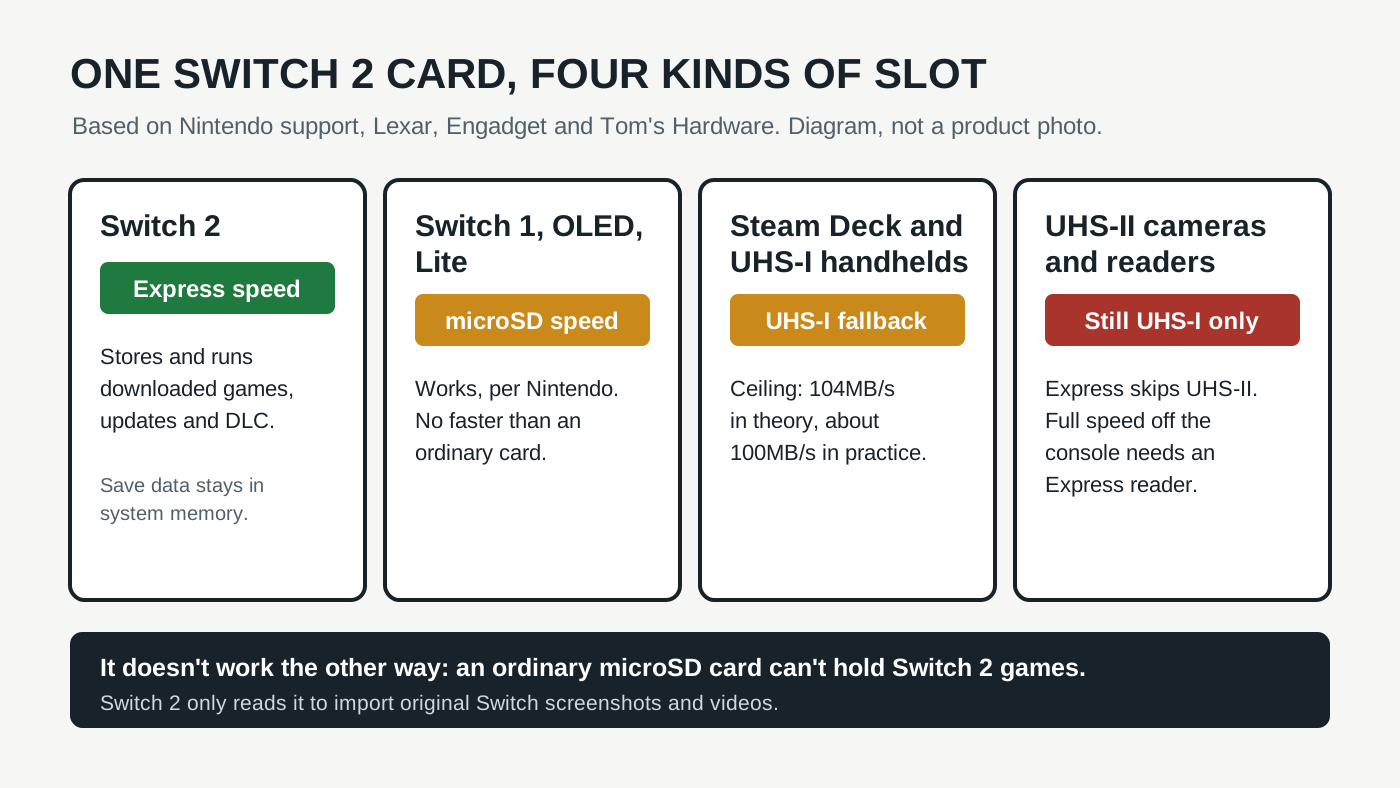
Nintendo's answer: yes, at microSD speed
Nintendo's microSD compatibility page settles the console half of the question with a small table. A microSD Express card works in Switch 2, and it also works in the original Switch family. The footnote is the part that matters: on an original Switch, "the data reading and writing speed for a microSD Express card will be equivalent to that of a microSD card."
The same table runs the other direction too, and that's where people get caught. An ordinary microSD card gets a "no" on Switch 2. Nintendo says the console can load original Switch screenshots and videos from it, and that's all. A card that held your Switch 1 library won't save or load Switch 2 digital games.
| Slot | Express card works? | Speed you get |
|---|---|---|
| Nintendo Switch 2 | Yes, required for games | Express (PCIe/NVMe) |
| Switch, Switch OLED, Switch Lite | Yes, per Nintendo | Ordinary microSD speed |
| Steam Deck and other UHS-I handhelds | Yes | UHS-I, 104MB/s ceiling |
| UHS-II cameras and readers | Yes | Still UHS-I, not UHS-II |
| microSD Express reader | Yes | Express speed |
Why the card slows down outside a Switch 2
An Express card carries two interfaces. One is the PCIe and NVMe link Switch 2 uses, the same kind of technology inside an SSD. The other is the older UHS-I bus nearly every microSD slot has used for years. Put the card in a slot that doesn't speak Express and it quietly falls back to UHS-I.
Engadget puts UHS-I's theoretical ceiling at 104MB/s and estimates the first Switch at closer to 100MB/s. In its own testing, Express cards produced sequential reads around 900MB/s. Tom's Hardware gives the same picture: backward compatible, at about 100MB/s reads and 90MB/s writes in older devices.
In plain terms, an Express card in an older slot behaves like a decent ordinary card. You've paid the Express premium and you're getting performance any well-rated UHS-I card already delivers there.
Steam Deck and other handhelds
Engadget notes that the original Switch and most other gaming handhelds, including Valve's Steam Deck, use UHS-I microSD slots. That's the fallback path above, so an Express card works in a Steam Deck and runs at UHS-I speed. Lexar's console storage guide makes the same promise for its PLAY PRO Express card, naming the original Switch, Steam Deck and ROG Ally.
We didn't find a matched Steam Deck benchmark of an Express card, so treat "works like a good UHS-I card" as the expectation, not a measured result. And don't buy one for a Deck expecting faster game loads than a regular card. Nothing in the slot can use the extra speed.
Cameras and card readers
This is the one that trips up photographers. You'd expect a card that reads at 900MB/s to beat a UHS-II card. In a UHS-II camera, it won't. Engadget says the Express standard isn't backward compatible with UHS-II, and Lexar's PLAY PRO product page says the card works in UHS-I and UHS-II host devices at UHS-I speeds. If a camera's video mode asks for a fast UHS-II card, an Express card running as UHS-I isn't what it wants. Check the camera maker's card list before you try.
Card readers follow the same rule. An ordinary UHS-I or UHS-II reader will mount the card at UHS-I speed. To get Express speed on a computer, you need an Express reader. Tom's Hardware tests its cards in one, and Engadget calls them pricey. For copying a few screenshots, any reader you already own is fine.
One card, two consoles: what Nintendo does and doesn't say
Households with both consoles often want one card to move between them. Nintendo documents compatibility, not a shared game library. Its page explains what each console can do with each card type. It doesn't describe a Switch 2 library and a Switch 1 library living side by side on one card, so we wouldn't plan around it.
The safer setup is one card per console. If you move a card, copy anything you care about first, because formatting a card in any console erases it. Save data isn't at risk on Switch 2 either way. Nintendo keeps it in system memory, as our Samsung vs SanDisk vs Lexar comparison explains.
The final decision
Buy a microSD Express card for the Switch 2. Don't buy one for an original Switch, a Steam Deck or a camera. In all three it works, but it runs at UHS-I speed, so you'd pay the Express premium for performance an ordinary card already gives you.
The useful middle case is the hand-me-down. If a Switch 2 is in the house or on the way, the Express card is the one card that works in both consoles. When the Switch 2 gets a bigger card later, the old one still has a second life in a Switch 1 or a Deck. Of the two 256GB cards here, the Samsung carries Nintendo's license and the SanDisk is the unlicensed alternative; both meet the Express standard Nintendo asks for. Our full comparison covers how they differ.
Skip both if the card is only ever going in a Switch 1, a Deck or a UHS-II camera. And don't expect the reverse trick to work: no ordinary microSD card, however fast, will run Switch 2 games.
Express cards that also work in older slots
Paid links. Gearsentials may earn a commission from purchases.
Both 256GB microSD Express. Full speed only in Switch 2 or an Express reader; UHS-I speed in a Switch 1, Steam Deck or camera. Samsung ASIN B0F3VTCZK8, SanDisk ASIN B0DFQGVLYF.