
Desk setups · Cable management
No-drill vs screw-in under-desk cable trays: which one fits your desk?
The power strip is on the floor again, and every charger brick hangs off the back of the desk like laundry. A tray fixes that. The catch is how it holds on. One kind needs holes in your desk. The other leaves clips you can see. Your desk decides which one you can live with.
By Adam Anderson, Editor and CEO, Gearsentials
This article contains paid Amazon links. Gearsentials may earn a commission from qualifying purchases. Affiliate standards.
Two cable trays we checked
Paid links. Gearsentials may earn a commission from purchases.
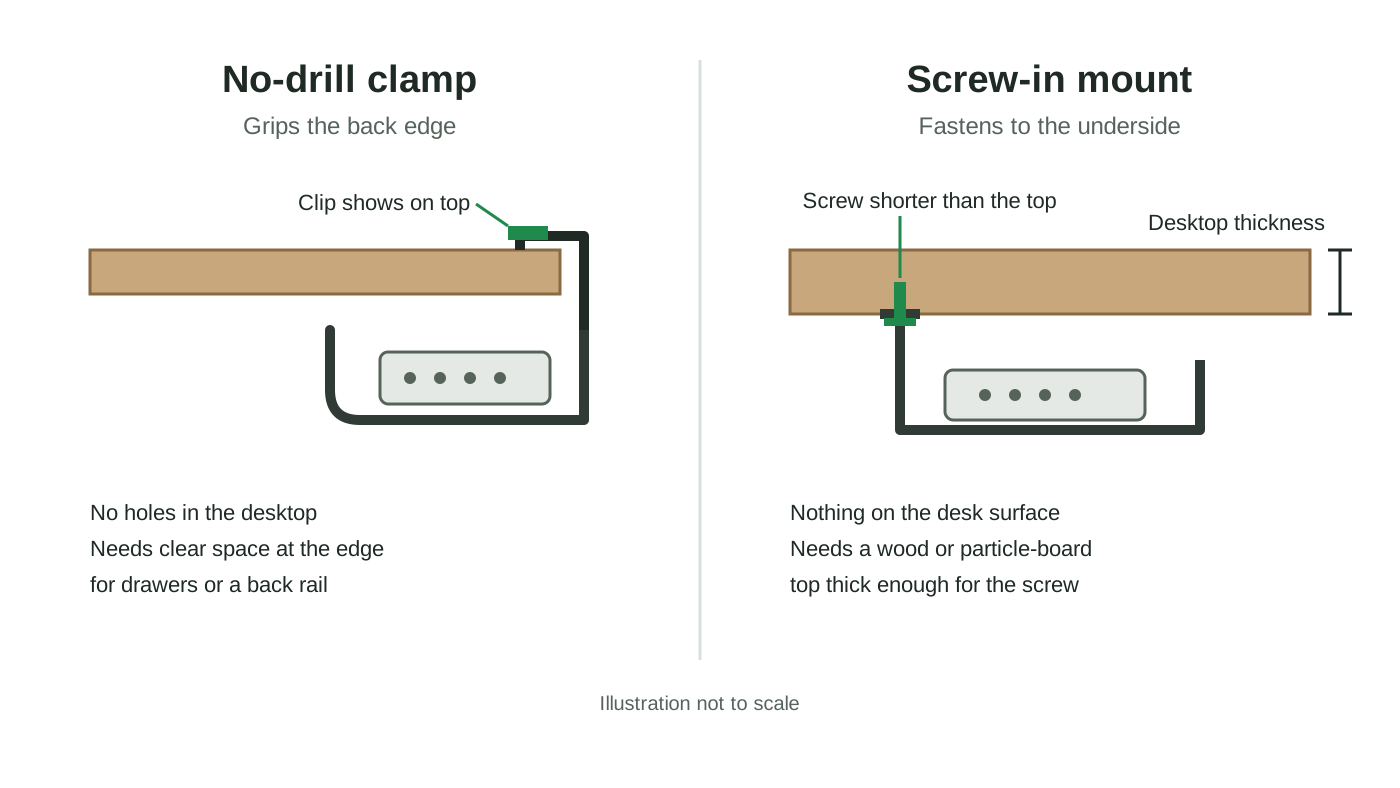
Start with the desktop, not the tray
Most tray shopping starts with size. It should start with what your desk is made of. A screw needs solid wood or particle board with enough thickness to bite into. A clamp needs a clean edge to grab and room behind it. Glass, metal and thin tops change the answer fast.
Then think about who owns the desk. A rented desk, an office desk or one you plan to sell soon is a bad place for new holes. A desk you'll keep for years is a different story. A hidden screw under the top is often the cleanest result.
Before you buy either one, check your desk maker's own accessories. UPLIFT, for example, sells a frame wire tray that attaches to two pre-drilled holes found on most UPLIFT desktops. If your desk already has holes for a tray, that settles a lot.
| Check | VIVO DESK-AC16-1C | Univivi 36-inch |
|---|---|---|
| Mounting | Screws into the underside | Clamps on, or screws in |
| Desktop the maker lists | Wood or particle board, at least 0.7 inches thick | Wood, glass or metal, per Univivi |
| Size | 17 x 6 x 5.8 inches | 36 x 5.5 x 5.5 inches |
| Material | Steel | 600D oxford fabric, which Univivi calls flame retardant |
| Listed load | 11 pounds | No number listed |
| What you'll see | Nothing on top of the desk | Clamp clips on the desktop edge |
Screw-in trays: the cleanest look, if the desk can take it
A screwed-in tray disappears. Nothing wraps over the edge, so the top of the desk stays clear. The VIVO tray is a good example of the type. It's a steel tray, 17 inches long and about six inches deep, that arrives fully assembled with its screws. VIVO lists an 11-pound load, enough for a power strip and a couple of chargers.
The rule that matters is thickness. VIVO says the desktop should be wood or particle board at least 0.7 inches thick. UPLIFT's own tray instructions add a smart step: hold the screw against the side of the desktop before you drive it, so you know it won't poke through the top. Its FlexMount guide goes further for non-UPLIFT desks. It asks for a top at least 0.75 inches thick and pilot holes no deeper than half an inch. A piece of tape on the drill bit marks the stop.
The VIVO tray's design also helps. VIVO says the back is closed to hide the power strip and the front is open for airflow and easy plugging. The tradeoff is length. Seventeen inches covers one strip, not a whole desk of bricks.
Screw-in steel tray
Paid links. Gearsentials may earn a commission from purchases.
17-inch single tray, model DESK-AC16-1C. Screws are included; you'll need a drill for pilot holes.
No-drill clamps: no holes, but you'll see them
A clamp tray hooks over the back edge of the desk and squeezes. No drill, no holes, and it comes off when you move. That's the whole appeal. The Univivi tray goes big, at 36 inches long, and it can also be screwed in if you change your mind later.
Univivi is honest about the downsides in its listing. The clips sit on top of the desk, so the tray can't be fully hidden. And if your desk has drawers or a back rail under the edge, it needs at least 5.3 inches of clear space there, or it won't fit. Univivi doesn't list a maximum edge thickness for the clamp, so measure a thick desktop before you order.
The fabric body has its own feel. Univivi says it unfolds to make adding or removing things easier, with built-in ties to hold items in place. It's also the only one of these two that Univivi says works on glass and metal tops, which a screw can't handle.
No-drill clamp tray
Paid links. Gearsentials may earn a commission from purchases.
36-inch fabric tray with clamps. It can also be screwed in. Check edge clearance first.
Sit-stand desks: slack matters more than the mount
On a standing desk, both trays ride up and down with the top. That's good. Your chargers and power strip move with the things they power. The weak link is the one cord that runs to the wall.
UPLIFT puts it plainly in its tray instructions: any cord plugged into the wall needs to be long enough for the desk's change in height. Raise the desk all the way before you zip-tie anything. If the wall cord pulls tight at full height, it'll tug on the strip every time you stand.
UPLIFT also notes that adhesive alone is an option for its own tray, but it recommends screws to hold the weight of a power strip. That's a fair warning for any tray. Sticky pads are the weakest way to hang a heavy load.
Measure these four things first
- Desktop thickness. Measure at the back edge, where the tray will go. Under 0.7 inches rules out the VIVO screws.
- Desktop material. Glass and metal need a clamp. Wood and particle board can take either.
- Edge clearance. Look for drawers, a back rail or a frame bar. The Univivi clamp needs 5.3 inches of space there.
- Run length. Line up your strip and bricks. If they span more than about 17 inches, the shorter tray won't hold them all.
For the bigger picture of what should be on the desk in the first place, our desk setup starter kit covers docks, chargers and cables. Fewer cables beats a bigger tray.
The final decision
If you own a solid wood or particle-board desk at least 0.7 inches thick, the screw-in VIVO tray is the better pick. It hides completely, it's steel with a listed 11-pound load, and it handles one power strip with room for a few chargers. Check the screw length against the desktop edge first, and the hard part is done.
The Univivi clamp tray earns its place on desks you can't or won't drill. Think glass tops, metal tops, rented desks and office furniture. It's also the one for a long row of bricks, since it's more than twice as long. Just accept the clips on the edge, and measure the clearance under it first.
Skip both if your desk maker sells a tray for pre-drilled holes, or if a frame bar blocks the space under the back edge. And on a sit-stand desk, fix the wall-cord slack first. No tray can save a cord that's too short.
The two trays, by mounting style
Paid links. Gearsentials may earn a commission from purchases.
VIVO screws in and stays hidden. Univivi clamps on and needs edge clearance.
Sources
- VIVO's Amazon listing for DESK-AC16-1C, reached through the product buttons above: size, steel build, 11-pound load and 0.7-inch desktop rule
- Univivi's Amazon listing for the 36-inch tray, reached through the product buttons above: clamp or screw mounting, 5.3-inch clearance and visible clips
- UPLIFT Desk: Under Desk Wire Tray instructions
- UPLIFT Desk: FlexMount Cable Manager instructions
- UPLIFT Desk: Desk Frame Wire Management Tray