
Desk setups · Laptop stands
Rain Design mStand: is a fixed-height laptop stand right for your desk?
You look down at a laptop all day, so you start shopping for stands. The Rain Design mStand is one you'll keep running into. It's one bent slab of aluminum with no knobs and no hinges. That's the appeal, and it's also the risk. It lifts your laptop to one height, and you can't change it.
By Adam Anderson, Editor and CEO, Gearsentials
This article contains paid Amazon links. Gearsentials may earn a commission from qualifying purchases. Affiliate standards.
The stand in this guide
Paid links. Gearsentials may earn a commission from purchases.
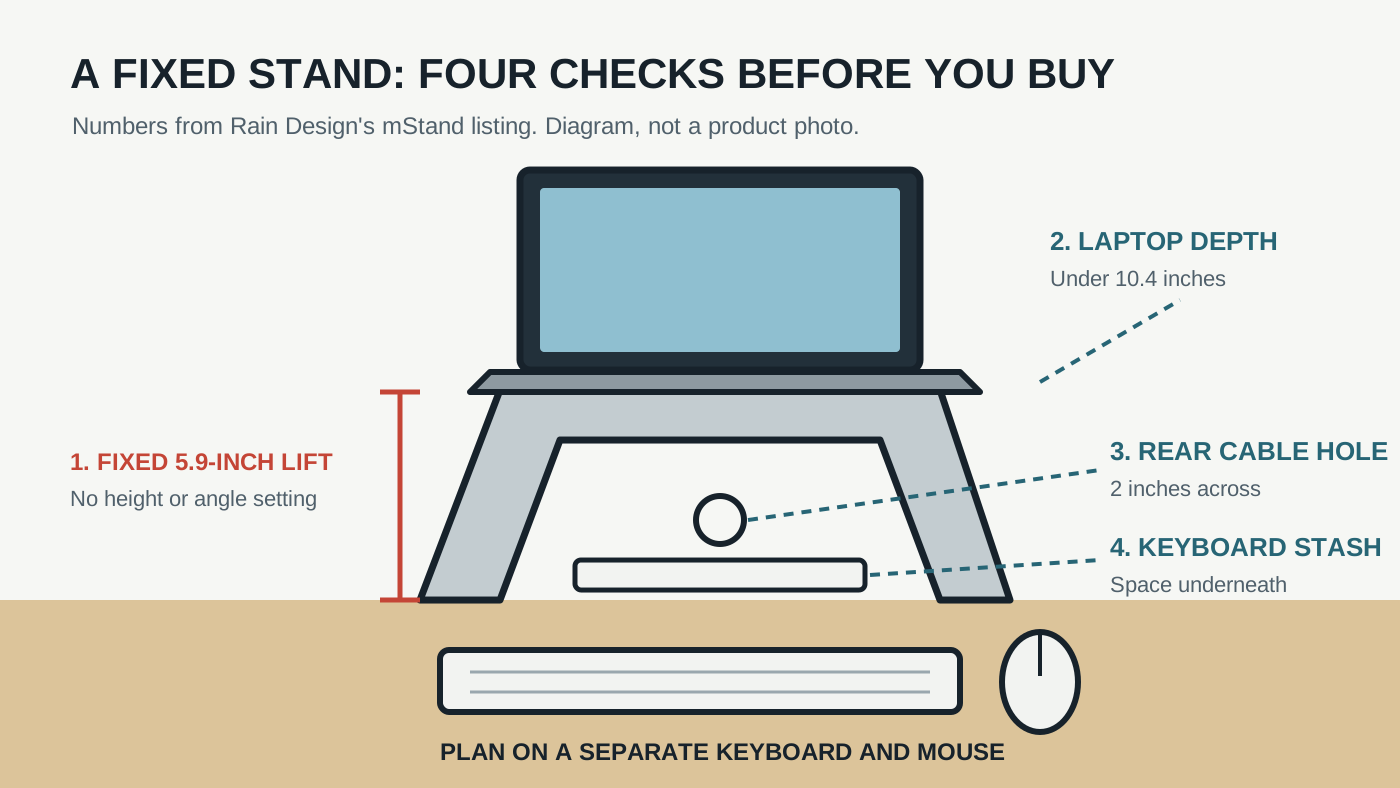
The one number that matters: 5.9 inches
Rain Design's Amazon listing says the mStand raises the screen by 5.9 inches. That's the whole adjustment range. There's no second setting, no tilt and no swivel. So the real question isn't whether the stand is well made. It's whether 5.9 inches lands the screen where your eyes are.
That depends on things the stand can't know: your chair, your desk height and how tall you sit. A few inches can be the difference between "finally" and "still looking down." An adjustable stand trades some of the mStand's rock-solid feel for the ability to fix that. A fixed stand asks you to be sure first.
| Check | Rain Design mStand |
|---|---|
| Screen lift | 5.9 inches, fixed |
| Laptop depth | Less than 10.4 inches |
| Build | One piece of aluminum, sand-blasted silver finish |
| Cables | Rear hole, 2 inches across |
| Underneath | Room to stash a keyboard |
Will your laptop fit?
Almost certainly, if it's a MacBook Air or MacBook Pro. The limit Rain Design gives is depth, front to back, under 10.4 inches. Apple's current spec pages put every model well inside that. The MacBook Air is 8.46 inches deep at 13 inches and 9.35 inches at 15 inches. The MacBook Pro is 8.71 inches at 14 inches and 9.77 inches at 16 inches.
Windows laptops vary more. Gaming laptops and big 17-inch and 18-inch machines can run deeper than that. Look up your exact model's depth, not its screen size, before you order.
Typing on it is the wrong plan
Here's the part that catches people. Once the laptop is up on the stand, its own keyboard is up there too. TechRadar's mStand review says you can type on it, but it doesn't recommend it. The angle is too steep for comfort, and the stand wobbles as you type.
So budget for a separate keyboard and mouse, or trackpad, along with the stand. If you already own them, great. If you don't, the real cost of this setup is higher than the stand alone. Our MX Master 4 guide covers one mouse option for a MacBook desk.
The good news is that the stand is built for that setup. Rain Design says there's room underneath to stash the keyboard when you're done. TechRadar points out that with a USB hub behind it, the stand becomes a kind of homemade docking station. The 2-inch rear hole keeps the charger and display cables together instead of draped over the desk.
Fixed aluminum stand
Paid links. Gearsentials may earn a commission from purchases.
Silver mStand, ASIN B000OOYECC. Fits laptops less than 10.4 inches deep. Plan on a separate keyboard and mouse.
What the reviews agree on
Two independent reviews, years apart, land in the same place. TechRadar called it stylish and sturdy, with decent airflow around the laptop. iMore's review praised its solid, stable build and built-in cord management. Both name the same downside: it doesn't adjust.
Rain Design also says the aluminum body acts as a heat sink to help cool the laptop. iMore lists keeping the laptop cool as a plus. Treat that as a nice extra, not a reason to buy. Neither source measured temperatures, and we didn't either.
The reviews are older, and that's worth knowing. But the parts that matter here still line up. The one-piece aluminum body, the rear cable hole and the single fixed height on today's listing match what the reviewers described.
Try this two-minute test first
You don't need the stand to know if its height works. Stack books under your laptop until it sits about 6 inches up. Sit the way you normally work and look at the screen.
- Eye line. If the top of the screen still sits well below your eyes, a fixed 5.9-inch lift may not be enough.
- Desk depth. Pull a keyboard in front of the stack. If it shoves your wrists off the desk edge, the desk is too shallow for this setup.
- Laptop depth. Check the spec sheet. Under 10.4 inches fits.
- Portability. If you carry the laptop out every day, picture unplugging it from a stand each time. That's fine for some people and a chore for others.
Building the rest of the desk around the laptop? Our desk setup starter kit covers docks, chargers and when a monitor makes more sense than a stand.
The final decision
Buy the mStand if the book test put your screen in the right spot and you already work with a separate keyboard and mouse. It's the simplest good answer to a hunched-over laptop desk. There's no knob to loosen, no hinge to sag and a real place for your cables to go. Every current MacBook Air and MacBook Pro fits it with room to spare.
Skip it if 6 inches left you still looking down, or if you plan to type on the laptop itself. A fixed stand can't fix the first problem, and reviewers say it wobbles with the second. An adjustable stand, or an external monitor, is the better spend there.
And if you move between desks every day, think hard about a solid, one-height stand that doesn't fold. It's desk furniture, not a travel accessory. Picked for the right desk, though, it's the kind of purchase you stop noticing, which is the point.
If the book test passed
Paid links. Gearsentials may earn a commission from purchases.
Best with a separate keyboard and mouse. Skip it if you need to adjust the height.
Sources
- Rain Design's Amazon listing for the mStand (sold by Rain Design), reached through the product buttons above: 5.9-inch lift, one-piece aluminum, 2-inch cable hole, keyboard stash and the 10.4-inch depth limit
- TechRadar: Rain Design mStand review
- iMore: Rain Design mStand Laptop Stand review
- Apple: MacBook Air tech specs
- Apple: MacBook Pro tech specs