
Slate 7 vs Roam 7 vs ASUS RT-BE58 Go
All three travel routers promise fast Wi-Fi in a small box. Hotel login tools, ports, power, software control, and the network you already own separate them.
By Adam Anderson, Editor and CEO
This article contains paid Amazon links. Gearsentials may earn a commission from qualifying purchases. Affiliate standards.
Slate 7 vs Roam 7 vs RT-BE58 Go compared
The table uses current manufacturer documentation. Power, modem, phone, and portal compatibility can still depend on firmware, cables, the upstream network, and the exact client.
| Decision | Slate 7 | Roam 7 | RT-BE58 Go |
|---|---|---|---|
| Best fit | Power users, advanced VPN routing, and multi-gig wired gear | Mainstream hotel travelers who want the Tether workflow | ASUS users who value ASUSWRT, AiMesh, and VPN Fusion |
| Wireless bands | 2.4GHz + 5GHz | 2.4GHz + 5GHz | 2.4GHz + 5GHz |
| 6GHz / 320MHz | No / no | No / no | No / no |
| Ethernet | 2.5GbE WAN + 2.5GbE LAN | 2.5GbE WAN + 1GbE LAN | 2.5GbE WAN + 1GbE LAN |
| Hotel Wi-Fi mode | Repeater/WISP, login mode, and MAC cloning | Hotspot/WISP with MAC selection | WISP with MAC cloning |
| VPN approach | WireGuard, OpenVPN, provider integrations, and policy routing | WireGuard/OpenVPN client and server plus VPN Merge | WireGuard/OpenVPN and others plus VPN Fusion |
| USB internet | Phone tethering or compatible external modem | Phone tethering or compatible external modem | Phone tethering or compatible external modem |
| Power input | USB-C PD: 5V/3A, 9V/3A, or 12V/2.5A | USB-C: 5V/3A | USB-C PD: 9V/2A or 12V/2A |
| Built-in battery / SIM | No / no | No / no | No / no |
| Size | 130 × 91 × 34mm; 295g | 126 × 93.5 × 36mm; TP-Link doesn’t publish weight | 99 × 111 × 36mm; 232g |
| Main downside | Heaviest and more complex than many travelers need | 1GbE LAN and less control than Slate 7 | 1GbE LAN and portal results that vary by site and firmware |
The five-minute setup to do before the trip
A travel router is most useful when it’s already configured before the suitcase closes. Do this at home while a backup internet connection and the manual are available:
- Update the firmware. Reboot and confirm the router returns with the expected settings.
- Create the private network. Set a unique administrator password plus a private SSID and password.
- Save local access details offline. Record the admin address and credentials somewhere available without internet.
- Load and test the VPN profile. Verify that the connection works, then learn how to pause it for portal login.
- Pack the exact power path. Confirm the charger or power bank supplies the documented voltage and current.
- Pack a short Ethernet cable. Room Ethernet is usually the cleaner upstream path when it’s available and active.
What to do when the hotel login page won’t appear
- Connect the router to the hotel network in WISP, hotspot, or repeater mode.
- Pause the VPN, kill switch, custom DNS, or filtering feature only if it blocks the portal.
- Use the vendor login workflow or open a plain HTTP page to trigger the portal.
- Use MAC cloning only when the vendor documents it and the hotel permits it.
- Finish the hotel login, restore the VPN and filters, then verify public IP and DNS.
GL.iNet explicitly warns that VPN, AdGuard Home, custom DNS, and DNS-rebinding protection can interfere with a captive portal. ASUS says some hotels may require MAC cloning, staff help, or a renewed login every 24 hours. TP-Link's “one-step” language describes its own workflow; it can’t standardize the hotel's portal.
Don’t assume any router bypasses a property's terms, paid-device limit, or network-sharing policy. The router creates one local network for your devices; the hotel still controls the upstream access.
Choose Slate 7 for control and dual 2.5GbE
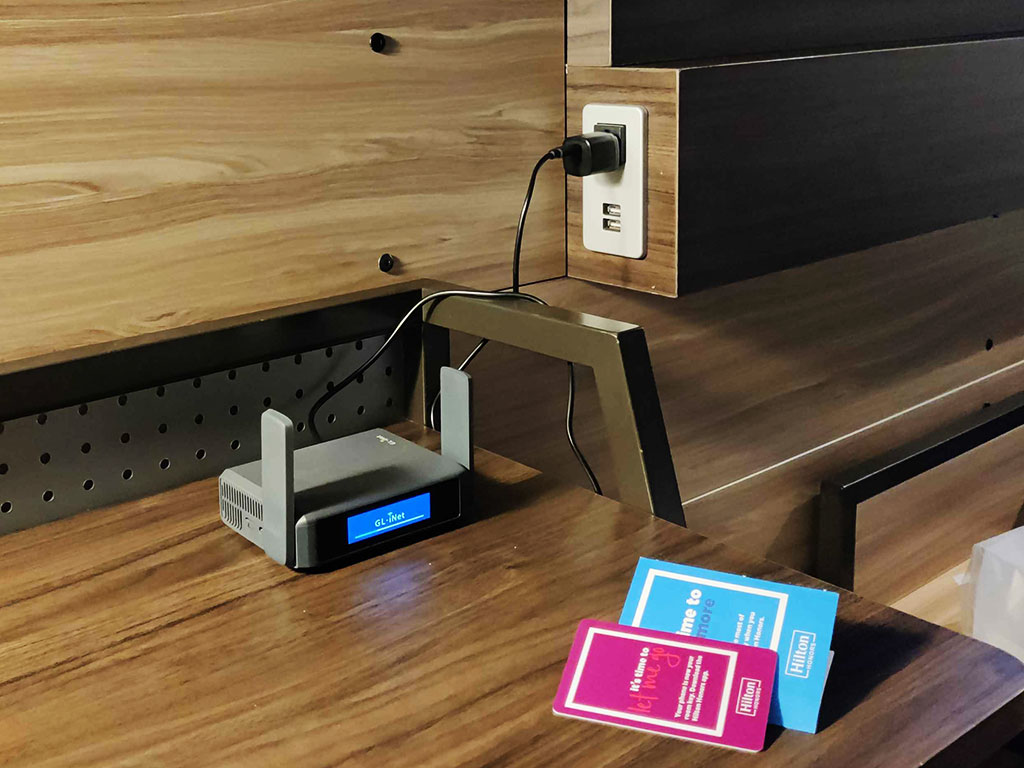
Slate 7 is the hardware and software specialist. It’s the only router here with both 2.5GbE WAN and 2.5GbE LAN, and its touchscreen can expose connection status, speed, QR codes, VPN controls, and common actions without opening a browser.
The OpenWrt-derived interface adds detailed routing, DNS, AdGuard Home, plugins, provider integrations, and policy control that the mainstream options don’t match. GL.iNet publishes favorable local client-mode ceilings of 490Mbps for WireGuard and 385Mbps for OpenVPN-DCO. Those aren’t promises for a distant hotel VPN server, but they show why this is the power-user pick.
In its direct comparison, RTINGS found Slate 7 faster overall and longer-ranging than ASUS under its protocols. Dong Knows Tech saw closer results at farther distances, so the evidence doesn’t justify a universal range guarantee. The safe advantage is the combination of dual 2.5GbE, tools, and control.
Reasons to skip Slate 7
- At 295g, it’s the heaviest of the three.
- Its extra controls add setup and troubleshooting choices.
- It has no built-in battery, cellular radio, 6GHz, or mesh.
- A traveler who will never use the touchscreen, VPN rules, or second 2.5GbE port can buy less.
GL.iNet Slate 7 buying option
Paid links. Gearsentials may earn a commission from purchases.
Exact GL-BE3600 offer checked August 2, 2026. Sold by GL Technologies and fulfilled by Amazon when checked.
Best for: Technical remote workers who will use dual 2.5GbE, advanced VPN routing, the touchscreen, or OpenWrt-derived tools. Skip if: The goal is only to share ordinary hotel Wi-Fi with one or two devices.
Choose Roam 7 for the cleanest mainstream hotel pitch
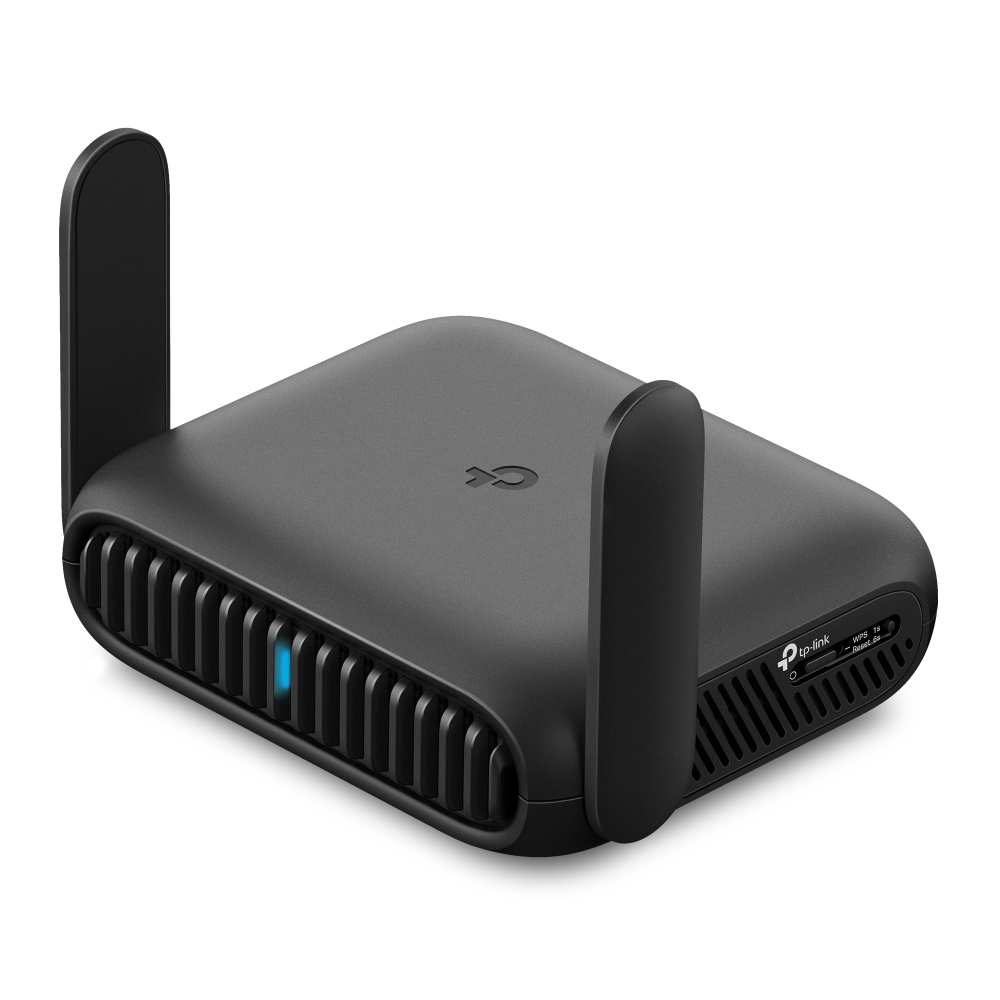
TP-Link organizes Roam 7 around seven modes, including router, hotspot, USB tethering, USB modem, access point, range extender, and client. Setup runs through the Tether app or web interface, and the company emphasizes one-time captive-portal authentication.
The useful distinction isn’t that Roam 7 can guarantee a hotel login—it can’t. It’s that TP-Link has made that workflow a first-class part of the product story. Its simple 5V/3A input is also easier to match with common power banks than the specific PD profiles listed for ASUS.
Independent evidence is encouraging but not transformative. Dong Knows Tech reported stable operation in a three-day stress test and measured the router at 170g, while finding its practical Wi-Fi 7 gain over Roam 6 modest. Treat 170g as that reviewer's measurement—TP-Link doesn’t publish an official weight.
Reasons to skip Roam 7
- The second Ethernet port is limited to 1Gbps.
- It offers less network-tool depth than Slate 7.
- Phone and external-modem compatibility isn’t universal.
- A cheaper Roam 6 may deliver the same practical result on ordinary hotel internet.
TP-Link Roam 7 buying option
Paid links. Gearsentials may earn a commission from purchases.
Exact TL-WR3602BE offer checked August 2, 2026. Shipped from and sold by Amazon when checked.
Best for: Travelers who value the Tether app, a clearly documented hotspot workflow, and straightforward 5V/3A power. Skip if: You need dual 2.5GbE, deeper VPN policy controls, or a guaranteed portal result.
Choose ASUS when the ecosystem is the feature
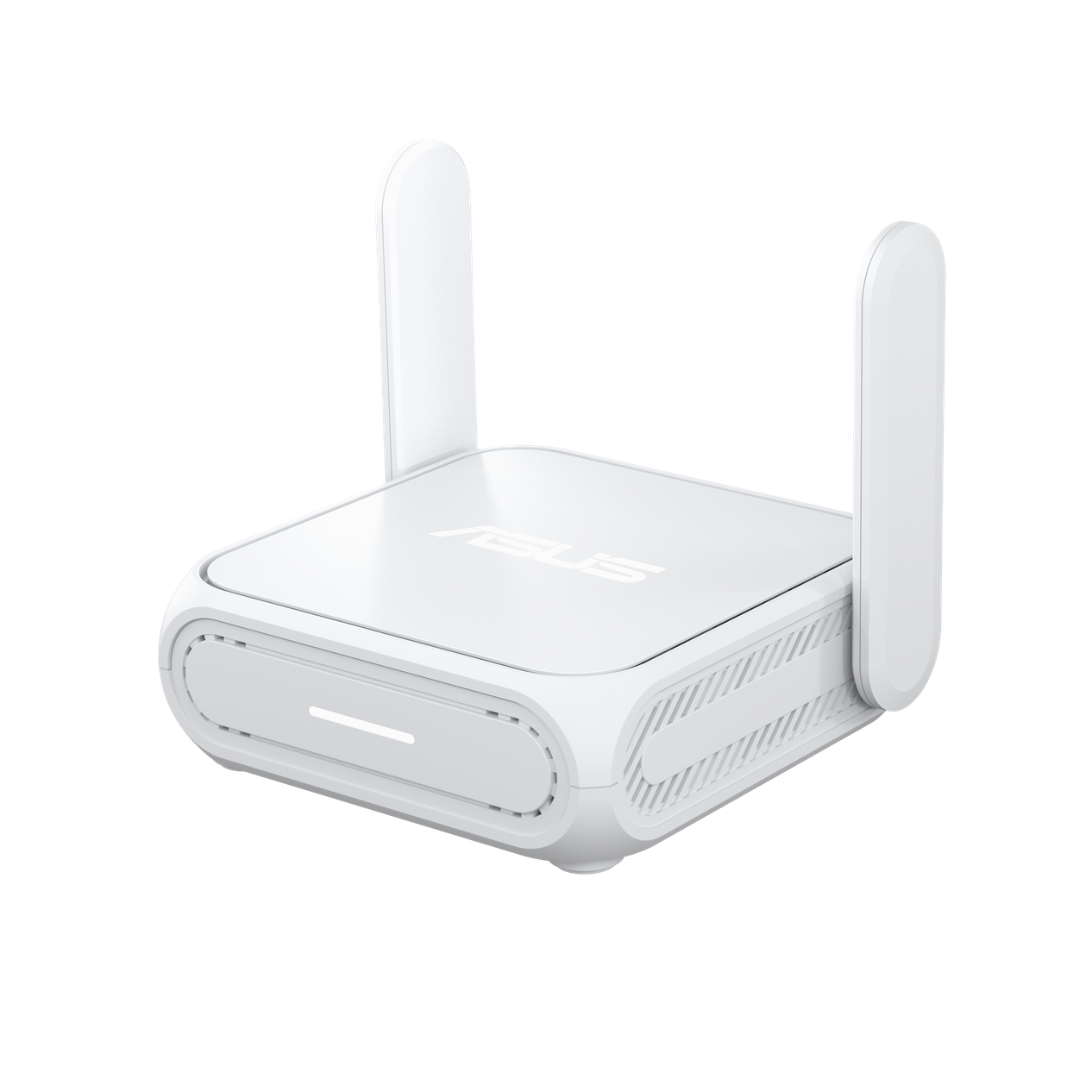
RT-BE58 Go brings the familiar ASUS software model into a travel router: ASUSWRT, the ASUS Router app, VPN Fusion, Guest Network Pro, AiProtection Classic, and AiMesh node support. That’s the strongest reason to choose it over the other two.
ASUS documents router, public-Wi-Fi/WISP, phone-tethering, repeater, access-point, media-bridge, and AiMesh uses. Its WISP guidance also admits the messy parts: portals can reappear on another device, MAC cloning or hotel assistance may be necessary, and authorization can renew every 24 hours.
Independent hotel results conflict. Lester Chan couldn’t finish a Starbucks portal flow even after MAC cloning, while another road test found ASUS the smoothest portal option but saw a reboot when switching upstream networks. The honest conclusion is that portal behavior is site- and firmware-specific—not that either report proves universal success or failure.
Reasons to skip RT-BE58 Go
- The LAN port is 1Gbps, and Slate 7 has the stronger wired layout.
- Its listed 9V/2A or 12V/2A power profiles need a compatible supply.
- Portal success isn’t guaranteed despite the WISP tools.
- AiMesh and ASUSWRT add little value when the home network uses another ecosystem.
ASUS RT-BE58 Go buying option
Paid links. Gearsentials may earn a commission from purchases.
Exact 3.6 Gbps Portable style checked August 2, 2026. Shipped from and sold by Amazon.com when checked.
Best for: Existing ASUS users who value ASUSWRT, AiMesh, VPN Fusion, Guest Network Pro, and AiProtection. Skip if: The purchase depends on dual 2.5GbE or a guarantee that every captive portal will work.
Power and ports matter more than the wireless ceiling
None of these routers has a battery. A USB-C plug doesn’t prove a charger or power bank supplies the correct profile. Roam 7 is the easiest match at 5V/3A. Slate 7 accepts 5V/3A, 9V/3A, or 12V/2.5A. ASUS lists 9V/2A or 12V/2A. Test the exact bank and cable before a trip; don’t discover a negotiation failure at check-in.
The under-100Wh power-bank guide can help with capacity and air travel, but its products still need to be checked against the router's input profile. Watt-hours describe stored energy; they don’t guarantee the required USB-C output mode. See the laptop power-bank air-travel guide for that separate decision.
Slate 7 is the wired winner because both Ethernet ports are 2.5GbE. Roam 7 and ASUS use one 2.5GbE WAN port plus one 1GbE LAN port. That distinction matters for local file transfers or a multi-gigabit wired handoff. It usually doesn’t matter on a hotel connection measured in tens or hundreds of megabits.
A travel router isn’t a home mesh system
These products prioritize portable upstream options and a private local network. A home mesh is designed around coverage, node placement, and backhaul across a larger floor plan. If the actual problem is a weak bedroom or office—not hotel login—start with the TP-Link Deco 7 vs eero 7 comparison or the eero 7, Pro 7, and Max 7 guide.
Who should skip all three?
- You travel with one laptop and one phone, and hotel Wi-Fi already works.
- You don’t need a persistent private SSID for streaming devices or work gear.
- You’re comfortable running a VPN directly on each device.
- Your existing Wi-Fi 6 travel router handles portals, tethering, and Ethernet.
- You expect the router to create a faster hotel connection or bypass hotel terms.
- You won’t update firmware or practice the portal-recovery workflow before travel.
The most trustworthy purchase is sometimes no purchase. Wi-Fi 7 helps the local link with compatible devices; it doesn’t fix a slow provider, crowded backhaul, bad portal, weak room placement, or a VPN server on the other side of the world.
The final decision
Choose GL.iNet Slate 7 for maximum control. Dual 2.5GbE, the touchscreen, and its OpenWrt-derived networking and VPN tools justify its extra weight when those features will be used.
Choose TP-Link Roam 7 for the mainstream hotel workflow. The Tether app, seven modes, and 5V/3A input make the purchase easy to explain. Keep the portal claim in perspective and compare its price with a capable Wi-Fi 6 model.
Choose ASUS RT-BE58 Go for the ASUS ecosystem. ASUSWRT, AiMesh, VPN Fusion, and Guest Network Pro are meaningful when they connect to an existing setup. They aren’t proof that a difficult hotel portal will cooperate.
If none of those reasons describes the trip, buy a cheaper Wi-Fi 6 router or use the devices directly. The highest wireless label is not the same as the lowest travel friction.
Compare the exact travel-router offers
Paid links. Gearsentials may earn a commission from purchases.
Exact US models checked August 2, 2026. Confirm the full model name and seller at the destination.
Best for: Slate 7 for control, Roam 7 for the mainstream hotel workflow, and ASUS for its ecosystem. Skip if: The trip doesn’t require a persistent SSID, router-level VPN, Ethernet sharing, or several devices behind one local network.
FAQ
Will a travel router automatically open a hotel captive portal?
Not always. Each router has a public-Wi-Fi workflow, but hotels can use different portal systems, MAC-address rules, renewal periods, and device policies. You may need to pause a VPN, use the vendor login mode, clone a permitted MAC address, or ask the hotel to authorize the router.
Do I need to turn off my VPN before hotel login?
Sometimes. A VPN, kill switch, custom DNS, or filtering feature can prevent the portal from loading. Pause only what blocks the login, authenticate with the hotel, then restore the VPN and verify the public IP and DNS before using the connection for sensitive work.
Does a travel router make public Wi-Fi secure?
It creates a private local network for your devices, but it doesn’t automatically make the upstream hotel network trustworthy or encrypt every internet connection. HTTPS protects supported site traffic, and a correctly connected VPN adds an encrypted tunnel to the VPN endpoint.
Can these routers use iPhone or Android USB tethering?
All three document phone-tethering or USB-internet modes. Compatibility can depend on the phone, cable, operating system, carrier, and router firmware. TP-Link explicitly says it can’t guarantee every phone or USB modem, so test the exact setup before travel.
Can I power these travel routers from a power bank?
Yes when the bank and cable provide the router's documented USB-C profile. Roam 7 uses 5V/3A. Slate 7 accepts 5V/3A, 9V/3A, or 12V/2.5A. ASUS lists 9V/2A or 12V/2A. A USB-C connector alone doesn’t prove the bank supplies the required voltage and current.
Do Slate 7, Roam 7, or RT-BE58 Go support 6GHz?
No. All three are dual-band Wi-Fi 7 routers using 2.4GHz and 5GHz. Their BE3600 label combines theoretical rates across those radios; it doesn’t mean 6GHz is present or that one device will receive 3.6Gbps.
Will Wi-Fi 7 make slow hotel internet faster?
No. Wi-Fi 7 can improve the local wireless link with compatible devices, but it can’t raise the hotel's backhaul speed, remove congestion, or change a provider cap. In many hotel rooms, the upstream connection is the limiting link.
Should I buy a cheaper Wi-Fi 6 travel router instead?
Often, yes. A cheaper Wi-Fi 6 model can provide the same private SSID, hotel-login workflow, Ethernet sharing, and router-level VPN for ordinary travel speeds. Pay for one of these Wi-Fi 7 models only when its ports, software, VPN control, or ecosystem solves a specific job.
Sources
- GL.iNet Slate 7 specifications
- GL.iNet Slate 7 documentation
- GL.iNet captive-portal instructions
- TP-Link Roam 7 specifications
- TP-Link Roam 7 user guide
- TP-Link public-hotspot instructions
- ASUS RT-BE58 Go specifications
- ASUS WISP and captive-portal instructions
- RTINGS Slate 7 and ASUS comparison
- TechRadar Slate 7 review
- Dong Knows Tech Roam 7 review
- Macworld Roam 7 review
- Tom's Hardware ASUS RT-BE58 Go review
- Lester Chan ASUS captive-portal test