
MacBook Neo vs MacBook Air M5
Apple now sells two 13-inch laptops at very different prices. The cheaper one cuts memory, ports, display support, and headroom, so the real question is which limits you will feel.
By Adam Anderson, Editor and CEO
This article contains paid Amazon links. Gearsentials may earn a commission from qualifying purchases. Affiliate standards.

Start with the exact configurations
The linked base models aren’t equal-capacity computers. The MacBook Neo is model MHFF4LL/A with A18 Pro, 8GB memory, 256GB storage, and an Indigo keyboard without Touch ID. The MacBook Air is model MDHH4LL/A with M5, an 8-core GPU, 16GB memory, 512GB storage, and Touch ID.
That difference matters before the processor benchmarks begin. More memory lets the Air keep more browser tabs, development tools, photo libraries, and background apps active without leaning as hard on storage. More base storage leaves room for local photos, video, games, and application data.
Apple also sells a 512GB Neo. That model equalizes storage and adds Touch ID, but it doesn’t add memory, keyboard backlighting, faster ports, or more external-display support. It remains an 8GB computer.
Choose a MacBook Neo configuration
Paid links. Gearsentials may earn a commission from purchases.
The 256GB configuration lacks Touch ID. The 512GB configuration adds Touch ID but remains fixed at 8GB memory.
Best for: 256GB when cloud storage and light work keep local needs small; 512GB when local storage and Touch ID justify the step up. Skip if: The work already needs more than 8GB, a backlit keyboard, Thunderbolt, or more than one external display.
MacBook Neo vs Air M5 at a glance
| Decision | MacBook Neo | 13-inch MacBook Air M5 | Buying consequence |
|---|---|---|---|
| Base Amazon offer | A18 Pro, 8GB memory, 256GB storage | M5 with 8-core GPU, 16GB memory, 512GB storage | The entry models aren’t memory- or storage-matched |
| Performance class | 6-core CPU, 5-core GPU, 60GB/s memory bandwidth | 10-core CPU, 8-core GPU, 153GB/s memory bandwidth | Air has much more room for coding, media work and heavy multitasking |
| Memory ceiling | Fixed 8GB | 16GB base; configurable to 24GB or 32GB | Neo can’t be upgraded later |
| Display | 13.0-inch, 2408×1506, 500 nits, sRGB | 13.6-inch, 2560×1664, 500 nits, P3 and True Tone | Brightness is close; Air adds workspace and wider color |
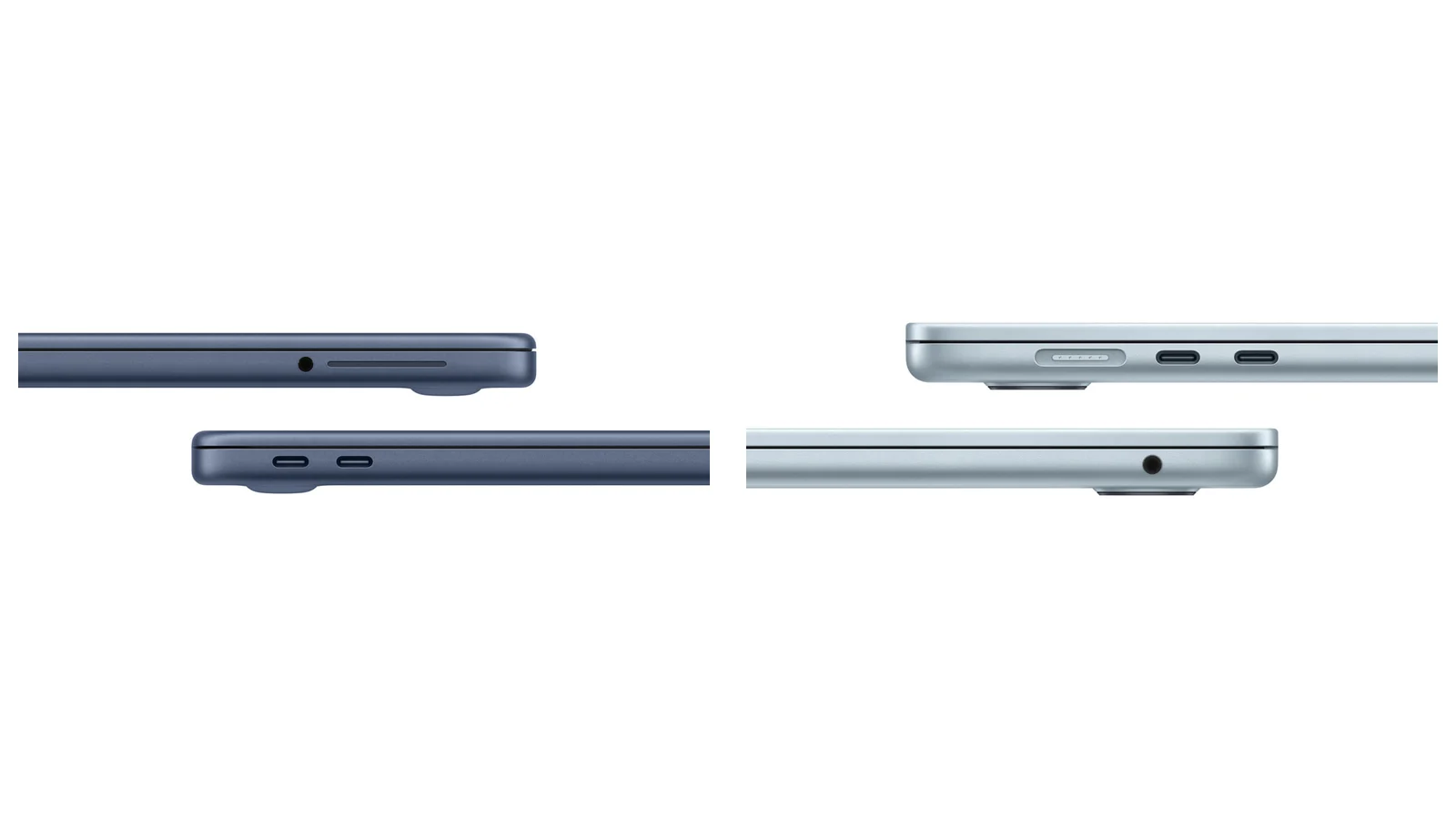
| Ports | One 10Gb/s USB-C with video, one 480Mb/s USB-C without video, headphone | MagSafe, two 40Gb/s Thunderbolt 4/USB4 ports, headphone | Neo's two USB-C ports don’t have equal capability |
| External displays | One external display up to 4K/60 | Up to two 6K/60 or 4K/144 displays | Air is the dock and multi-monitor choice |
| Battery claim | Up to 16 hours video or 11 hours web | Up to 18 hours video or 15 hours web | Matched independent testing also favored Air |
| Included charger | 20W USB-C | 40W Dynamic Power Adapter; fast-charge support with 70W or more | A larger Neo charger isn’t a documented fast-charge upgrade |
| Keyboard | No backlight; 256GB model lacks Touch ID | Backlit keyboard with Touch ID | The 512GB Neo adds Touch ID, not backlighting or more memory |
| Camera and audio | 1080p camera, two speakers, two mics | 12MP Center Stage camera, four speakers, three mics | Air is better equipped for frequent calls and media |
| Weight | 2.7 pounds | 2.7 pounds | Neo has the smaller footprint; Air is thinner |
| Repair design | Screw-attached battery; modular USB-C ports and headphone jack | Battery adhesive and specialized press tooling | Neo has the more repair-friendly battery procedure |
MacBook Neo is enough for ordinary computer work
Neo isn’t slow simply because it’s the less expensive Mac. Its A18 Pro can handle Safari, Microsoft Office, Pages, messaging, video calls, streaming, photo adjustments, and casual games. It is fanless, silent, runs macOS Tahoe, supports Apple Intelligence, and works with ordinary Mac applications.
The risk appears when an ordinary workload grows. Eight gigabytes is the permanent ceiling. Large browser sessions, virtual machines, development environments, high-resolution photo libraries, sustained video editing, and several heavy apps at once can all create pressure. Buying the 512GB Neo gives macOS more storage for swap, but storage isn’t a substitute for more memory.

The Air advantage is measurable, not theoretical
Notebookcheck tested the exact base configurations used in this comparison. The M5 Air was about 17 percent faster in Geekbench single-core and 87 percent faster in multi-core. Its Geekbench Metal result was about 2.1 times the Neo result, while 3DMark Steel Nomad was about 2.4 times higher.
Those numbers don’t mean every web page opens twice as fast. They mean the Air has substantially more headroom when work scales across CPU cores, stresses the GPU, keeps many tasks in memory, or runs for longer periods. Both are fanless, so both remain silent; the Air simply begins from a much higher performance level.
The same distinction applies to Apple Intelligence. Both Macs qualify for the software features. The Air's 16GB base memory, stronger GPU, and 153GB/s memory bandwidth make it the safer choice for demanding on-device AI tools; Neo isn’t excluded from the platform.
Check the stronger primary-computer option
Paid links. Gearsentials may earn a commission from purchases.
This exact offer is the 2026 13-inch M5 model MDHH4LL/A with 16GB memory, 512GB storage, and an 8-core GPU.
Best for: Coding, media work, heavier multitasking, local AI tools, docks, multiple displays, and longer ownership. Skip if: The machine will stay limited to light everyday work and the added capacity won’t change the experience.
The Air display is larger and better for color
The names hide a size difference. Neo uses a 13.0-inch panel; the 13-inch Air uses a 13.6-inch panel. Both are sharp 60Hz LCDs rated at 500 nits, and independent testing measured virtually identical average brightness around 519 nits.
Air wins on more than size. It supports the P3 color gamut and True Tone. Notebookcheck measured 98.1 percent P3 coverage on the Air and 72.2 percent on Neo, with higher contrast on Air. Neo's screen remains a good fit for documents, websites, streaming, and sRGB-oriented work; the Air is the more defensible choice for color-sensitive photos and video.

The Neo USB-C ports aren’t equivalent
This is the easiest specification to miss. Neo's rear, hinge-side USB-C port supports USB 3 at up to 10Gb/s and drives its one external display. The front port is USB 2 at up to 480Mb/s and doesn’t support DisplayPort. Both can charge the computer, but they do not create a two-port high-speed workstation.
The Air has two 40Gb/s Thunderbolt 4/USB4 ports plus MagSafe, so charging doesn’t have to occupy a data port. Apple supports up to two 6K/60 or 4K/144 external displays, along with other single-display modes. If a Thunderbolt dock, fast external SSD, capture device, or multi-monitor desk is part of the plan, the Air is the clear answer.
Air lasts longer and has the better charging path
Apple rates Neo for up to 16 hours of streamed video or 11 hours of wireless web use. Air is rated for up to 18 hours of video or 15 hours of web use. Different tasks, brightness, networks, and software can move those numbers substantially.
The matched independent Wi-Fi test at 150 nits ran for 12 hours 51 minutes on Neo and 16 hours 11 minutes on Air. At maximum brightness, the results fell to 4 hours 49 minutes and 6 hours 39 minutes. The useful conclusion isn’t an exact promise: Air had a consistent runtime advantage in the same test method.
Neo includes a 20W adapter and Apple makes no fast-charge claim. Air includes a 40W Dynamic Power Adapter and supports fast charging with a 70W-or-higher USB-C power adapter. A larger third-party charger can simplify a Neo setup, but it shouldn’t be sold as a documented fast-charge upgrade.
Neo has the more repair-friendly battery
The lower-cost Mac wins an important long-term category. Apple's Neo battery procedure removes a screw-attached pack without battery-adhesive removal. The M5 Air procedure requires five adhesive strips, adhesive cleaning and replacement, a battery support frame, a press plate, and specialized press tooling.
iFixit's Neo teardown found modular USB-C ports and a modular headphone jack, plus relatively accessible speakers and display. The keyboard is independently replaceable but still a tedious repair. iFixit awarded Neo a 6-out-of-10 repairability score. That doesn’t make everything upgradeable: memory and storage remain soldered. We also don’t assign the M5 Air a score without an exact M5 teardown.
The fair conclusion is narrower: MacBook Neo has a substantially more repair-friendly battery and internal layout. That deserves weight if the computer will be kept for years and service access matters.
Who should buy each MacBook?
Buy MacBook Neo when:
- The work is primarily web, documents, school, calls, and streaming.
- Cloud storage or a small local library makes 256GB workable.
- One 4K external display is enough.
- The smaller footprint or easier battery repair matters.
- The live price gap is more valuable than Air's unused headroom.
Buy the M5 MacBook Air when:
- This will be the primary computer for several years.
- Coding, large photo libraries, video, or heavy multitasking is expected.
- A Thunderbolt dock, fast storage, or two external displays is planned.
- A backlit keyboard, Touch ID, better camera, and stronger audio matter.
- 16GB memory and 512GB storage reduce the risk of an early replacement.
The final recommendation
MacBook Neo is the right answer when it solves a clearly bounded everyday-computing job and the lower purchase cost is the point. Don’t dismiss it because it uses A18 Pro; dismiss it only when fixed 8GB memory, asymmetric ports, or one-display support conflict with the actual work.
For most buyers choosing one computer to keep and grow into, the M5 MacBook Air is the safer recommendation. You aren't paying for one heroic benchmark; the extra capacity is spread across the whole machine: memory, storage, performance, ports, displays, screen, battery, camera, audio, keyboard, and charging.
Compare the exact recommended configurations
Paid links. Gearsentials may earn a commission from purchases.
Confirm the model, memory, storage, color, seller, and AppleCare selection on Amazon before ordering.
Best for: Neo for a bounded light-work job; Air for the stronger primary computer and longer ownership runway. Skip if: The exact configuration at the destination doesn’t match the label in this guide.
FAQ
Is MacBook Neo a real Mac or a limited mobile computer?
It’s a Mac running macOS Tahoe with broad third-party Mac-app compatibility, iPhone Continuity features, and Apple Intelligence support. Its limits are hardware limits: fixed 8GB memory, lower CPU and GPU performance, asymmetric USB-C ports, and one external display.
Does the 256GB MacBook Neo have Touch ID?
No. The exact 256GB model linked here, MHFF4LL/A, has a standard Magic Keyboard without Touch ID. The 512GB Neo, MHFG4LL/A, adds Touch ID. Neither Neo keyboard is backlit.
Can MacBook Neo use two external monitors?
Apple documents one external display up to 4K at 60Hz, connected through the rear, hinge-side USB 3 port. The front USB-C port is USB 2 and doesn’t support DisplayPort. The M5 MacBook Air supports up to two external displays within Apple's documented modes.
Is 8GB enough for MacBook Neo?
It can be enough for web browsing, documents, classes, video calls, streaming, and light creative work. It’s a poor long-term fit for sustained coding, large photo libraries, video editing, virtual machines, heavy multitasking, or workloads that already pressure 8GB. The memory can’t be upgraded later.
Is MacBook Neo easier to repair than MacBook Air?
Its battery and internal layout are substantially more repair-friendly. Apple's Neo battery procedure uses screws rather than battery adhesive, while the M5 Air procedure requires adhesive removal and specialized press tooling. Memory and storage remain soldered on both.
Should I buy the 512GB MacBook Neo instead of MacBook Air?
The 512GB Neo fixes the base model's storage shortage and adds Touch ID, but it still has 8GB memory, the same A18 Pro performance, the same port limits, no keyboard backlight, and one-display support. Buy it only when those limits fit and the live price gap remains meaningful.
Sources
- Apple MacBook Neo technical specifications
- Apple 13-inch MacBook Air M5 technical specifications
- Apple MacBook Neo announcement and press media
- Apple MacBook Air M5 announcement and press media
- Apple MacBook Neo battery repair procedure
- Apple MacBook Air M5 battery repair procedure
- Notebookcheck MacBook Neo base-model testing
- Notebookcheck MacBook Air M5 base-model testing
- iFixit MacBook Neo teardown